> ## Documentation Index
> Fetch the complete documentation index at: https://www.bazhuayu.com/docs/llms.txt
> Use this file to discover all available pages before exploring further.

# 相对xpath、绝对XPath

> 通过实例讲解绝对 XPath 和相对 XPath 的概念、循环框 XPath 与相对 XPath 的关系，以及如何根据需求修改相对 XPath。

在学习本教程之前，您需要具备八爪鱼基础操作和XPath相关知识，如果还未掌握，请先学习以下课程。

<a href="/docs/zh/academy/basic-collection/beginner/custom-collection" target="_blank" rel="noopener noreferrer">自定义配置</a>

<a href="/docs/zh/academy/xpath/getting-started/why-use-xpath" target="_blank" rel="noopener noreferrer">XPath入门</a>

什么是绝对xpath？

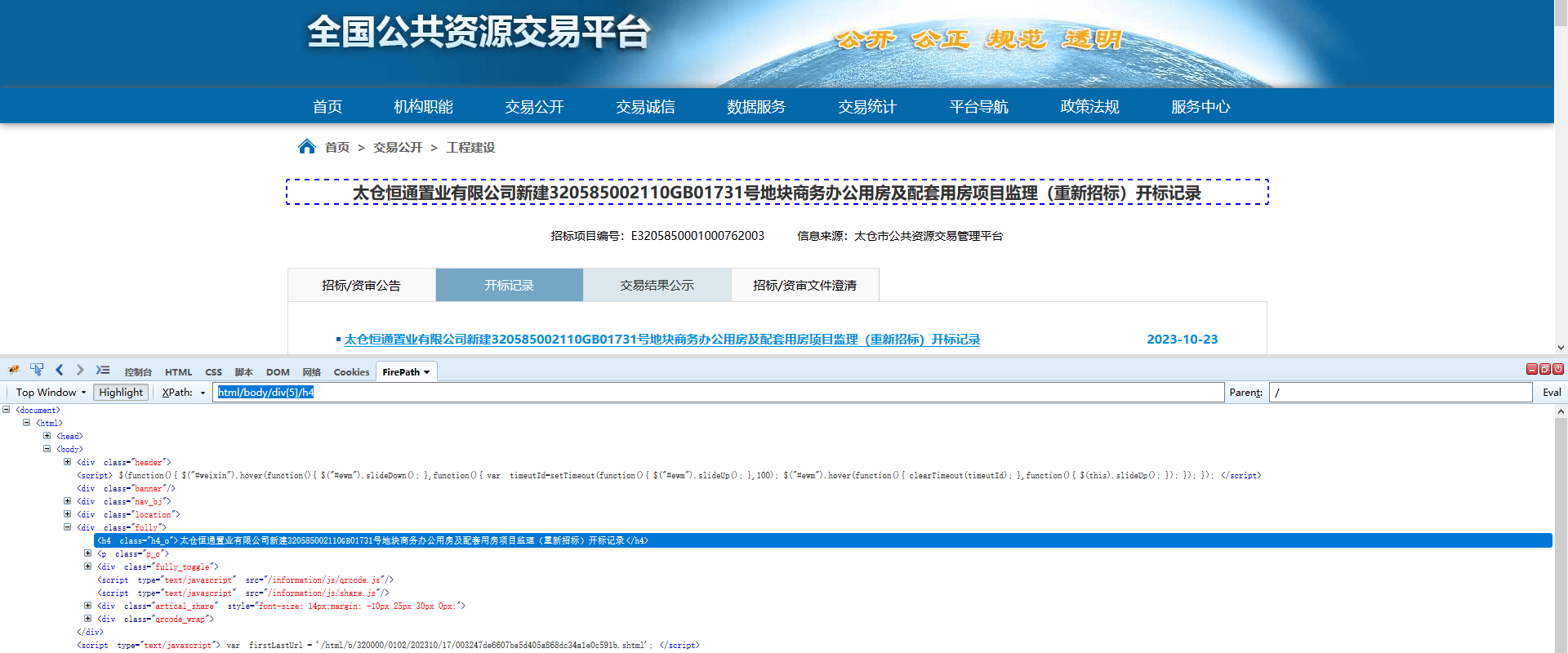
HTML的基本结构如下，无论浏览器里的页面多么的千奇百怪，他们都遵循HTML文档结构，这个结构的根节点是html，具体内容在body节点了，这样在定位节点时，只要从根节点出发，沿着子节点，最后到叶子节点，无论定位的节点隐藏的多深，肯定能定位到。这就像身份证的住址一样，省市县镇乡村，960万平方公里的土地上总能找到那个独一无二的你。

<div style={{ textAlign: "center" }}>
  <img src="https://mintcdn.com/bazhuayu/LsqhRMjOG2uphnGy/assets/academy/xpath/relative-absolute-xpath/6535e72309e78.png?fit=max&auto=format&n=LsqhRMjOG2uphnGy&q=85&s=3229c06314a27c88306a59c904c970a4" width="1920" height="800" data-path="assets/academy/xpath/relative-absolute-xpath/6535e72309e78.png" />
</div>

如上图网址所示：[http://www.ggzy.gov.cn/information/html/a/320000/0102/202310/17/003247de6607be5d405a868dc34a1e0c591b.shtml该网页标题字段的绝对xpath是：html/body/div\[5\]/h4](http://www.ggzy.gov.cn/information/html/a/320000/0102/202310/17/003247de6607be5d405a868dc34a1e0c591b.shtml该网页标题字段的绝对xpath是：html/body/div\[5]/h4)

说明：xpath需要掌握xpath基础知识，详情可学习<a href="/docs/zh/academy/xpath/getting-started/why-use-xpath" target="_blank" rel="noopener noreferrer">xpath知识</a>

相对Xpath，即相对于循环框的Xpath，有两个典型特征：跟随循环联动；与循环框的XPath合并成一条完整的定位XPath。

有两种常见应用场景：提取循环内的数据；提取循环外的数据。

以下将具体说明。

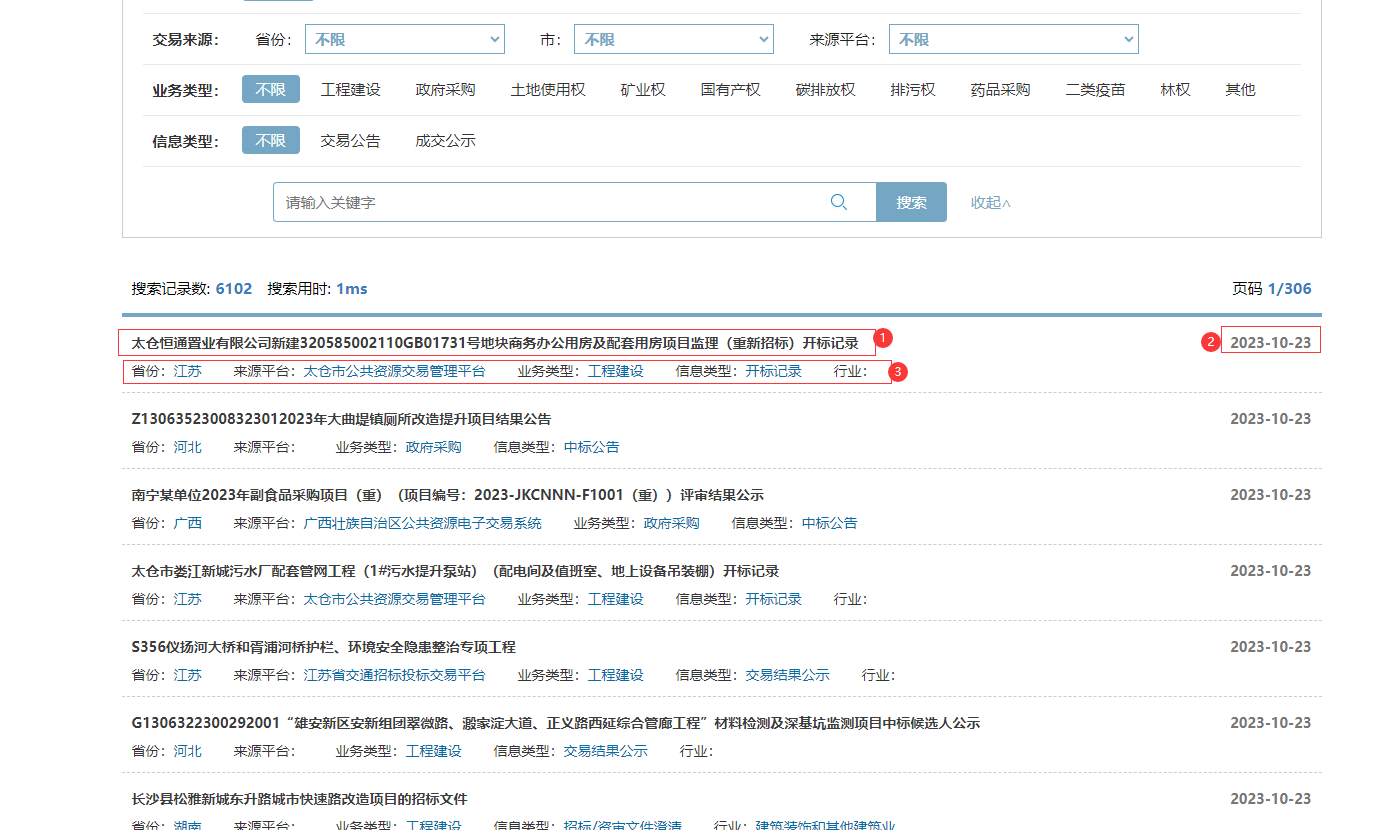
示例网址：<a href="http://deal.ggzy.gov.cn/ds/deal/dealList.jsp" target="_blank" rel="noopener noreferrer">[http://deal.ggzy.gov.cn/ds/deal/dealList.jsp](http://deal.ggzy.gov.cn/ds/deal/dealList.jsp)</a>

需求：采集这个网址列表的 项目标题，省份，来源平台，业务类型，时间等字段

<div style={{ textAlign: "center" }}>
  <img src="https://mintcdn.com/bazhuayu/LsqhRMjOG2uphnGy/assets/academy/xpath/relative-absolute-xpath/6535e358b0f39.png?fit=max&auto=format&n=LsqhRMjOG2uphnGy&q=85&s=cb04b3ab9983ee186693ee7b713dd85c" width="1398" height="830" data-path="assets/academy/xpath/relative-absolute-xpath/6535e358b0f39.png" />
</div>

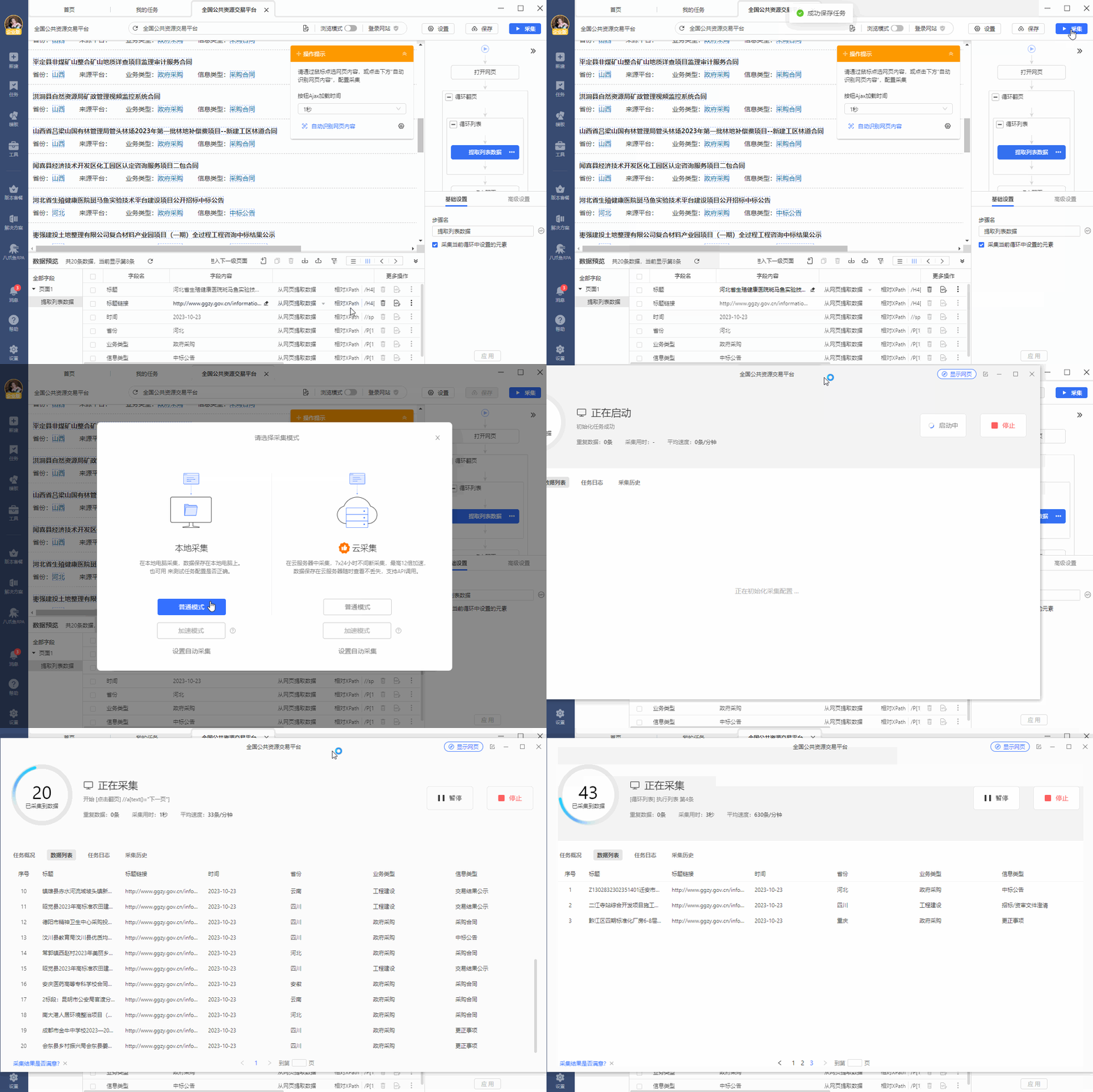
Step1：用 <a href="/docs/zh/academy/basic-collection/beginner/list-collection" target="_blank" rel="noopener noreferrer">采集列表数据</a> 中学到的方法，配置列表数据采集；

<div style={{ textAlign: "center" }}>
  <video className="tutorial-animation" controls preload="none" playsInline poster="/assets/academy/xpath/relative-absolute-xpath/6535e4d0ab586.webp" aria-label="教程演示动画">
    <source src="https://mintcdn.com/bazhuayu/71s0_euLSXSIp3C3/assets/academy/xpath/relative-absolute-xpath/6535e4d0ab586.mp4?fit=max&auto=format&n=71s0_euLSXSIp3C3&q=85&s=68045ca20fb4a93e921e3bf99e8208c7" type="video/mp4" data-path="assets/academy/xpath/relative-absolute-xpath/6535e4d0ab586.mp4" />

    您的浏览器不支持视频播放，请更新浏览器后重试。
  </video>
</div>

Step2：八爪鱼自动创建的循环列表，会为我们自动生成循环框的XPath和相对XPath，我们来看一下：

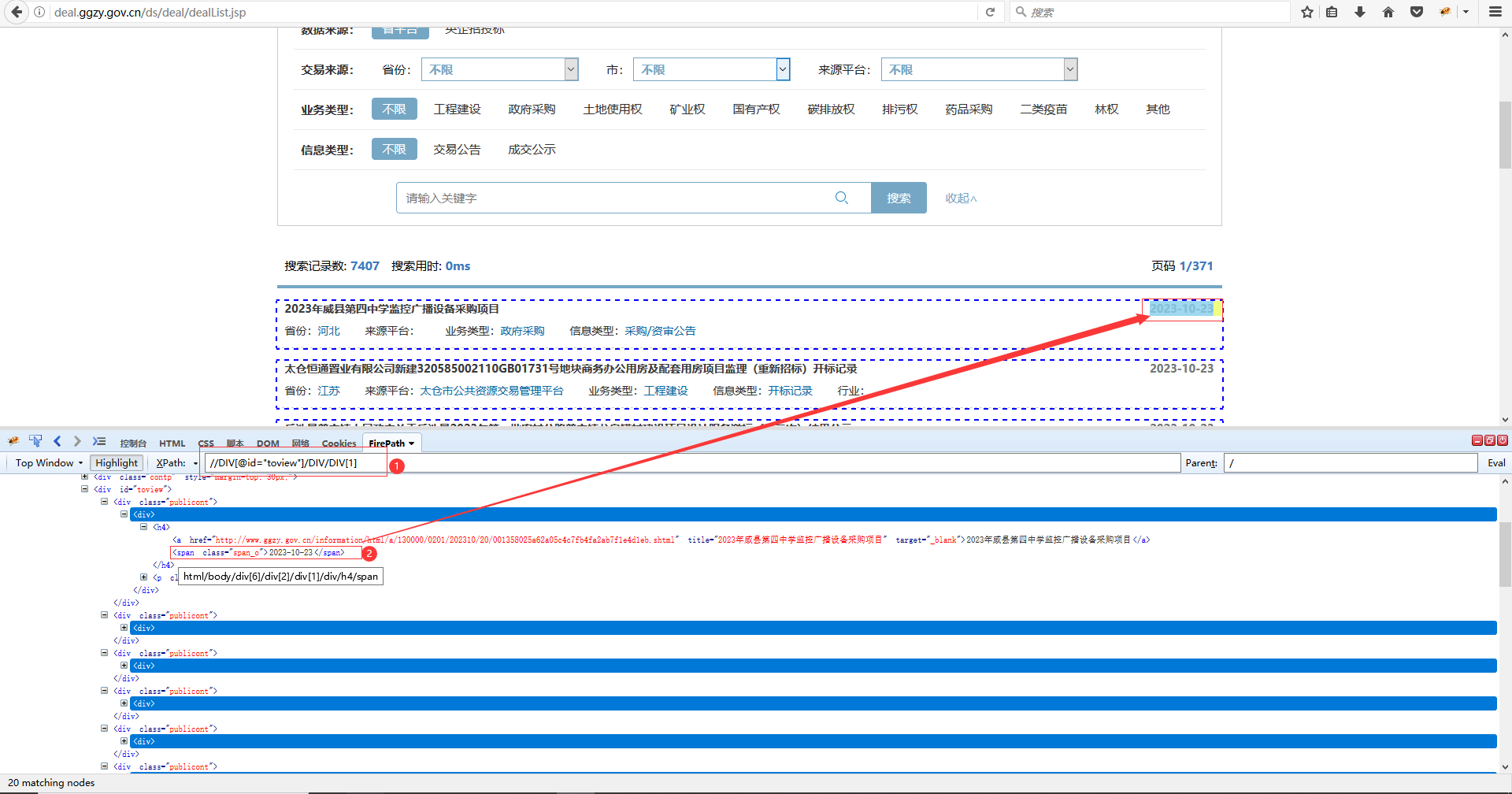
## 循环框的XPath

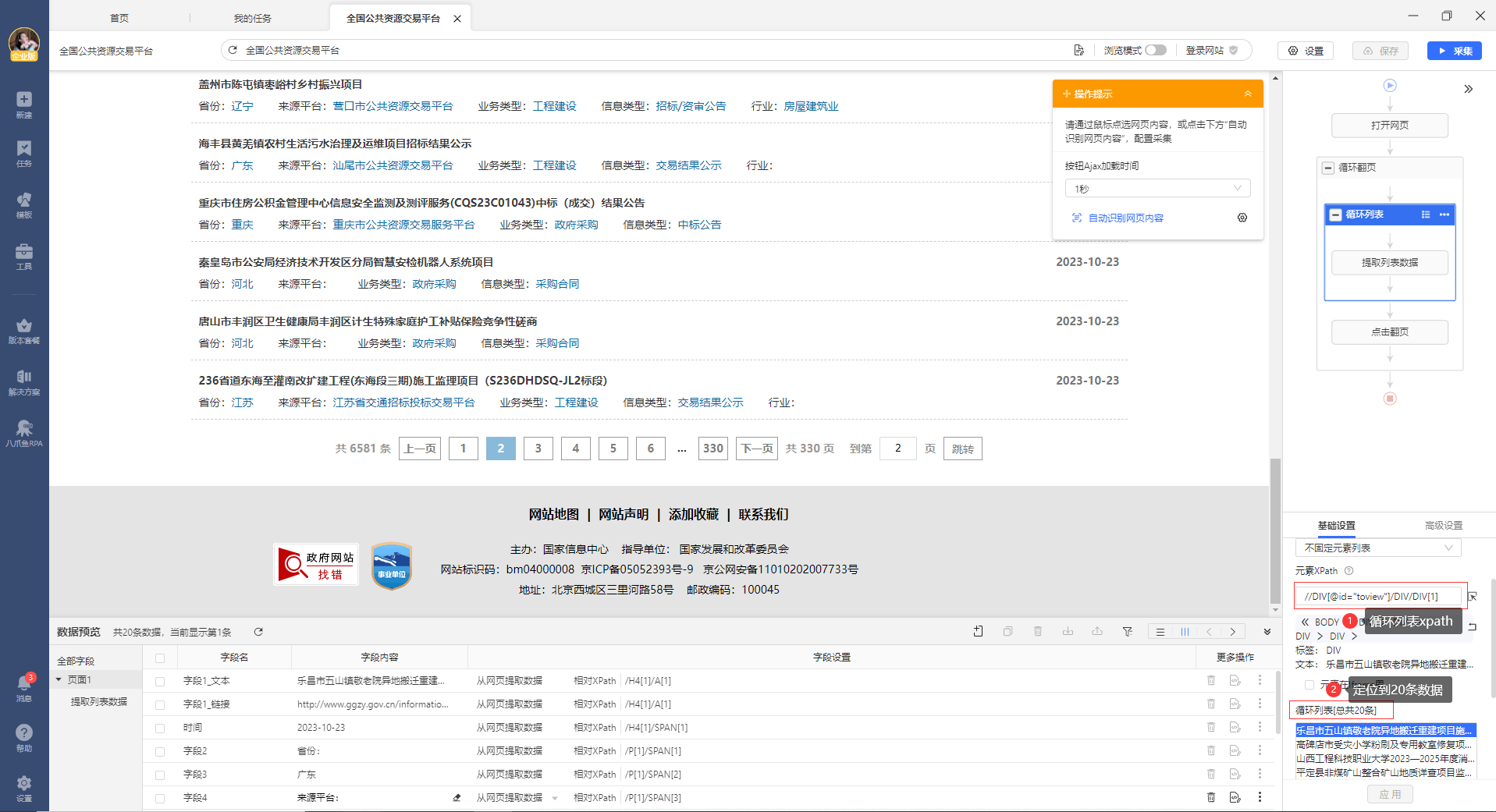
循环框的XPath为：//DIV\[@id="toview"]/DIV/DIV\[1]。通过这条XPath，找到20个列表项，对应着页面中的20个数据列表。

<div style={{ textAlign: "center" }}>
  <img src="https://mintcdn.com/bazhuayu/LsqhRMjOG2uphnGy/assets/academy/xpath/relative-absolute-xpath/6535e9b19d79f.png?fit=max&auto=format&n=LsqhRMjOG2uphnGy&q=85&s=21ac17efed5683103eb8ea996157c628" width="1917" height="1041" data-path="assets/academy/xpath/relative-absolute-xpath/6535e9b19d79f.png" />
</div>

## 相对XPath

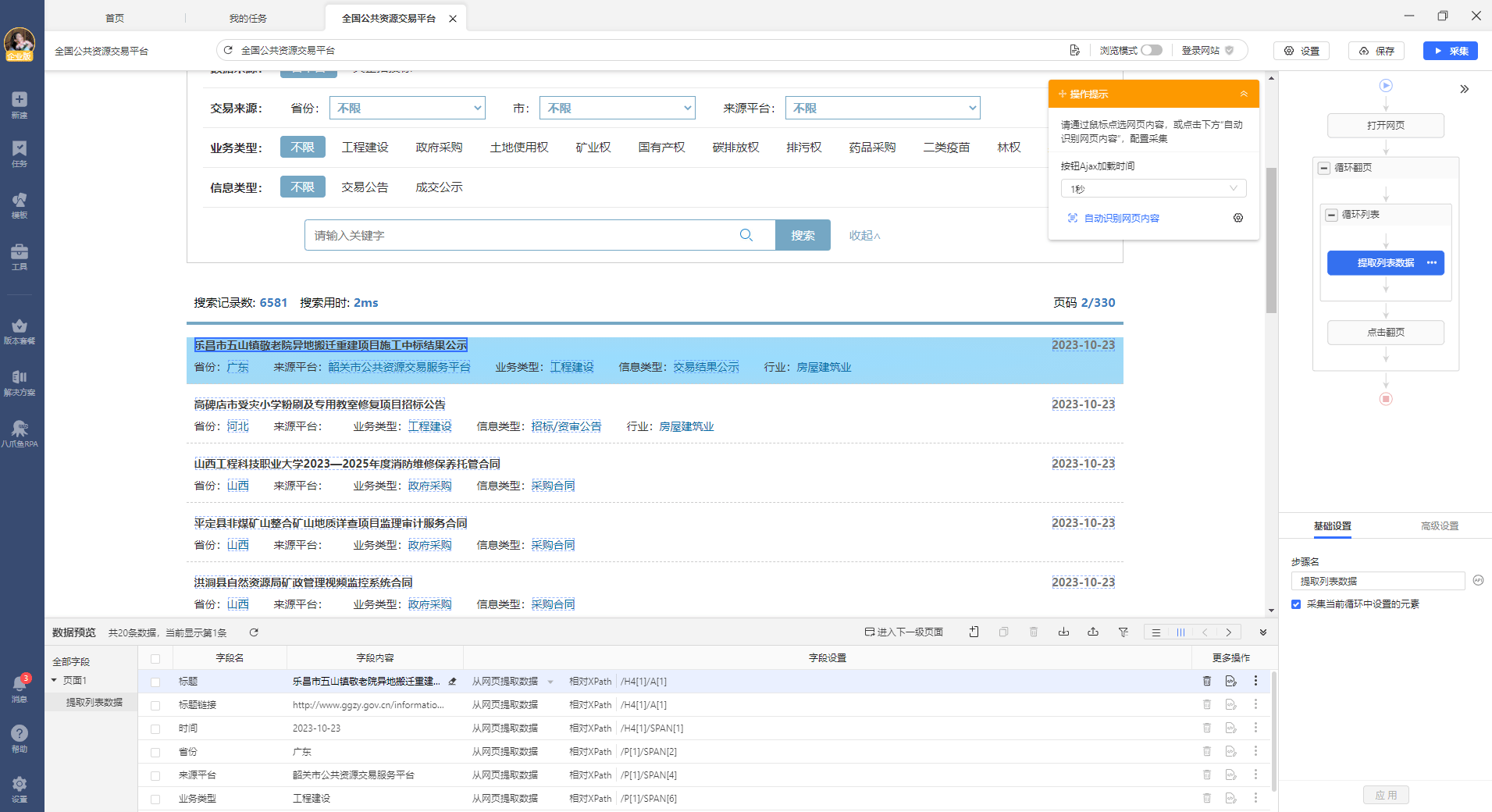
每个循环项中，都有 项目标题，省份，来源平台，业务类型，时间等字段。查看每个字段的定位XPath，查看路径见下图。

可以看到，每个字段使用的都是相对XPath，以标题和时间这2个字段为例。

【标题】字段的相对XPath：/H4\[1]/A\[1]

【时间】字段的相对XPath：/H4\[1]/SPAN\[1]

<div style={{ textAlign: "center" }}>
  <img src="https://mintcdn.com/bazhuayu/LsqhRMjOG2uphnGy/assets/academy/xpath/relative-absolute-xpath/6535edcb06f82.png?fit=max&auto=format&n=LsqhRMjOG2uphnGy&q=85&s=b22e528cdb3feb74ce9d20ad8e4840fe" width="1911" height="1040" data-path="assets/academy/xpath/relative-absolute-xpath/6535edcb06f82.png" />
</div>

循环框的XPath和相对XPath的关系

循环框的XPath：定位到列表项。

相对XPath：字段相对于循环框（列表项）的位置。

循环框的XPath + 相对XPath = 每一个循环项中字段的XPath

<div style={{ textAlign: "center" }}>
  <img src="https://mintcdn.com/bazhuayu/LsqhRMjOG2uphnGy/assets/academy/xpath/relative-absolute-xpath/6535edecf0291.png?fit=max&auto=format&n=LsqhRMjOG2uphnGy&q=85&s=36de9401ecea3dc0be3dfd74bb383487" width="1087" height="152" data-path="assets/academy/xpath/relative-absolute-xpath/6535edecf0291.png" />
</div>

正是因为相对XPath的存在，我们能够实现循环和字段的联动采集：

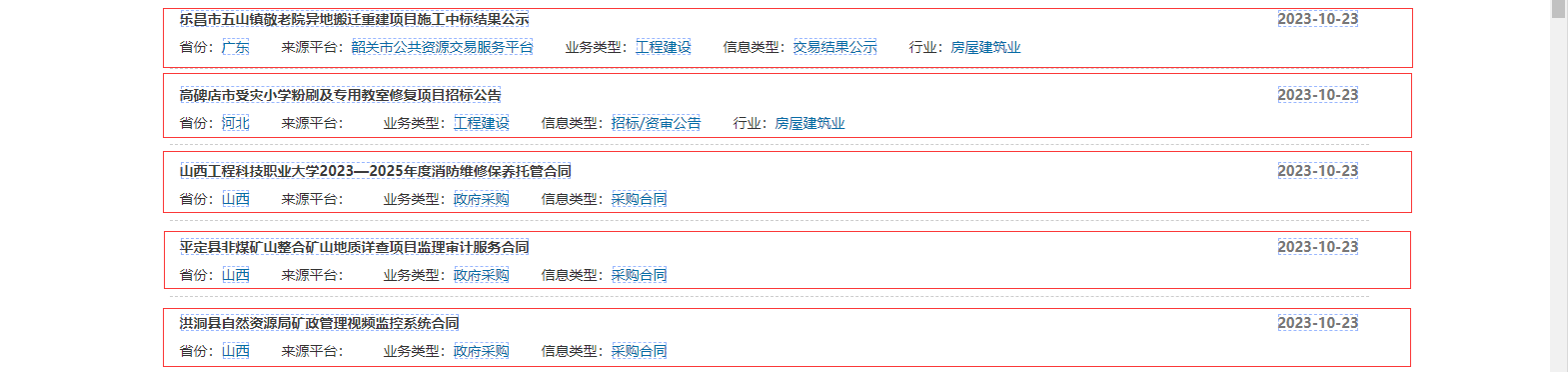
循环框当前项为列表1 - 定位到列表1中的字段（标题，省份，来源平台，业务类型，时间）

循环框当前项切换为列表2 - 定位到列表2中的字段

循环框当前项切换为列表3 - 定位到列表3中的字段

循环框当前项切换为列表4 - 定位到列表4中的字段

......

最后1个列表 - 采集最后1个列表中的字段

<div style={{ textAlign: "center" }}>
  <img src="https://mintcdn.com/bazhuayu/LsqhRMjOG2uphnGy/assets/academy/xpath/relative-absolute-xpath/6535ee7095732.png?fit=max&auto=format&n=LsqhRMjOG2uphnGy&q=85&s=76a2fb0cef76a1158ab409f0edee9bec" width="1569" height="372" data-path="assets/academy/xpath/relative-absolute-xpath/6535ee7095732.png" />
</div>

如果没有用相对XPath会怎样？

无法实现循环项与字段联动的效果，只能固定采集到第一个循环项中的字段。

## 根据需求，修改相对XPath

通过上面的学习，我们已经知道了相对XPath的原理。在大多数情况下，八爪鱼会为我们自动生成相对XPath，正确提取到循环项中的字段。此时无需修改。少数情况下，自动生成的相对XPath，无法适配所有网页，存在部分字段提取不到，或者字段错位的情况，此时就需要我们自行修改。

以下看1个实例。

## 修改相对XPath实例

上文中的网站，【时间】这个字段的相对XPath为：/H4\[1]/SPAN\[1]，看不出时间字段的特征。我们可以写一条带有时间字段特征的、好理解的。如何修改？

Step1：将循环框的 XPath //DIV\[@id="toview"]/DIV/DIV\[1] ，复制到浏览器控制台中，然后点击展开这个标签，找到时间标签。

<div style={{ textAlign: "center" }}>
  <img src="https://mintcdn.com/bazhuayu/LsqhRMjOG2uphnGy/assets/academy/xpath/relative-absolute-xpath/6535eff272341.png?fit=max&auto=format&n=LsqhRMjOG2uphnGy&q=85&s=b637bb8fb688d363fd0b666d68110c39" width="1920" height="1008" data-path="assets/academy/xpath/relative-absolute-xpath/6535eff272341.png" />
</div>

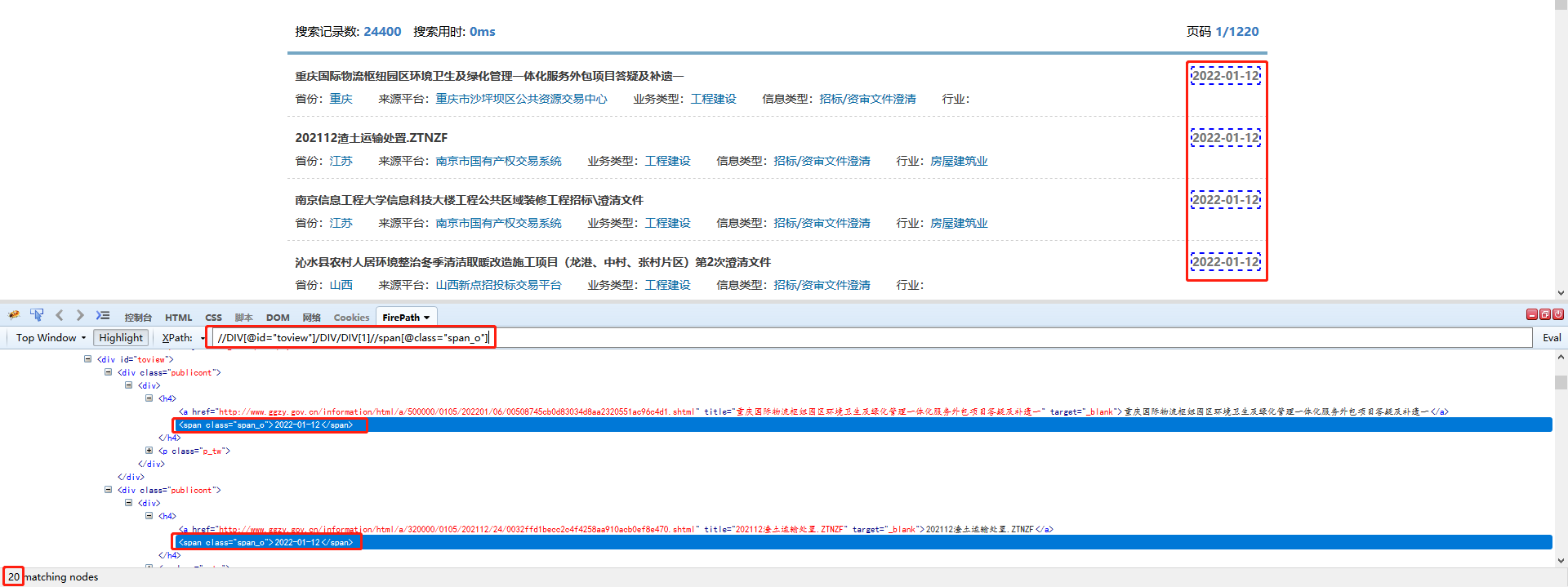
Step2：然后找到【时间】字段对应的网页源码。可以看到它是一个span标签，有一个class属性，属性值是 pan\_o，根据这个特性可以写一条定位XPath：//DIV\[@id="toview"]/DIV/DIV\[1]//span\[@class="span\_o"] 。

可以看到，网页上所有【时间】字段都被虚线框圈起来了，说明都被定位到了。

<div style={{ textAlign: "center" }}>
  <img src="https://mintcdn.com/bazhuayu/LsqhRMjOG2uphnGy/assets/academy/xpath/relative-absolute-xpath/6535f00366f3d.png?fit=max&auto=format&n=LsqhRMjOG2uphnGy&q=85&s=fb5a03d56f8af5b6cfa3696350049b60" width="1920" height="719" data-path="assets/academy/xpath/relative-absolute-xpath/6535f00366f3d.png" />
</div>

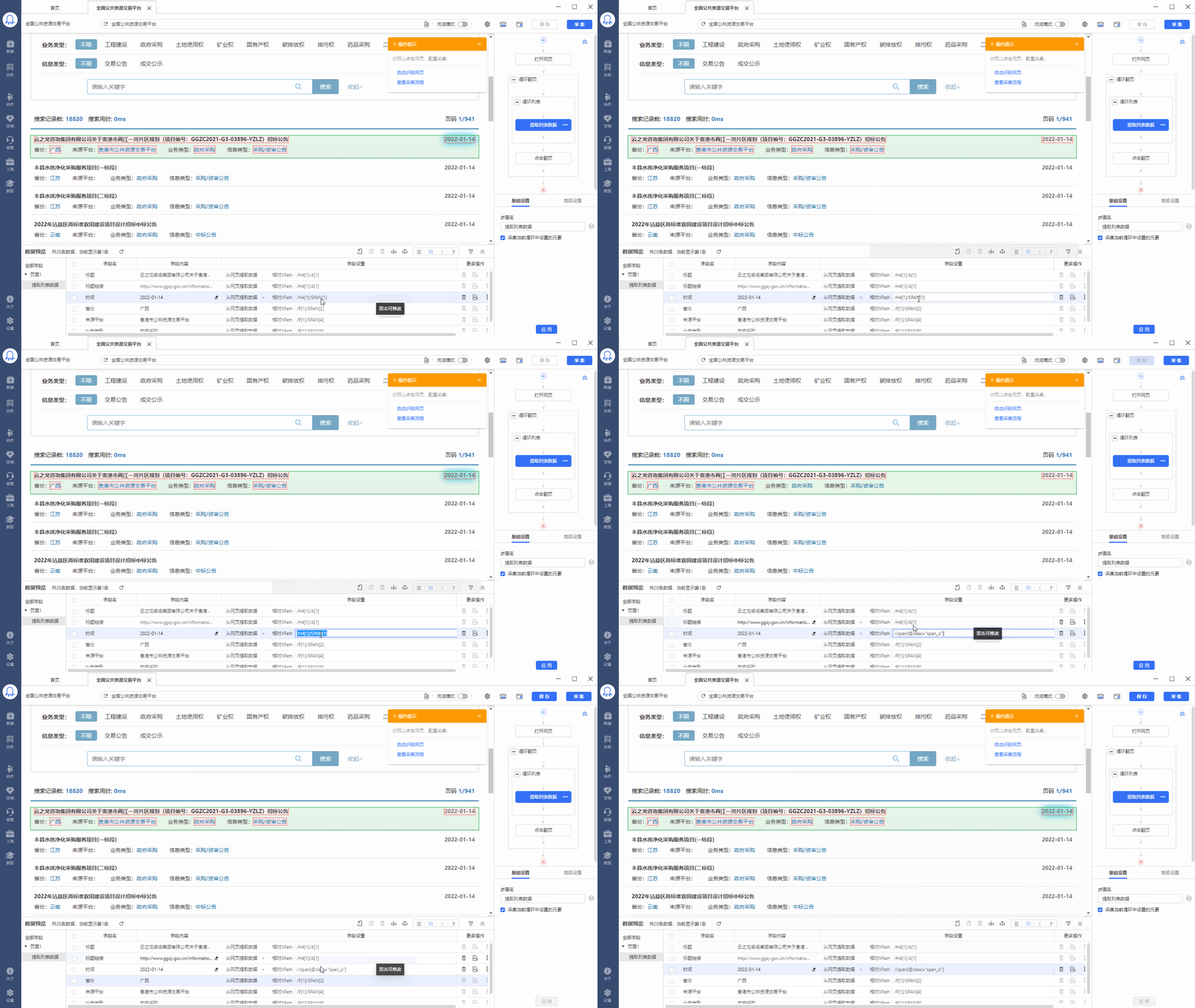
Step3：根据前面学到的知识，循环框的XPath是 //DIV\[@id="toview"]/DIV/DIV\[1] ，【时间】字段的相对XPath 则是：//span\[@class="span\_o"] 。

将 //span\[@class="span\_o"] ，复制粘贴到八爪鱼中【时间】字段的相对XPath输入框中。然后回车保存。

<div style={{ textAlign: "center" }}>
  <img src="https://mintcdn.com/bazhuayu/LsqhRMjOG2uphnGy/assets/academy/xpath/relative-absolute-xpath/6535f00d1858f.gif?s=ac49b25df20e498858cbc26c05aa8496" width="1600" height="900" data-path="assets/academy/xpath/relative-absolute-xpath/6535f00d1858f.gif" />
</div>

这样我们就完成了【时间】字段的相对Xpath的改写。启动【本地采集】，看一下采集结果，循环项中的数据都被正常采集下来了。

<div style={{ textAlign: "center" }}>
  <img src="https://mintcdn.com/bazhuayu/LsqhRMjOG2uphnGy/assets/academy/xpath/relative-absolute-xpath/6535ef7687c0d.gif?s=f2a321e401c967ed3ed042dff5ae1520" width="1200" height="800" data-path="assets/academy/xpath/relative-absolute-xpath/6535ef7687c0d.gif" />
</div>

示例网址：<a href="http://zu.wuhan.fang.com/cities.aspx" target="_blank" rel="noopener noreferrer">[http://zu.wuhan.fang.com/cities.aspx](http://zu.wuhan.fang.com/cities.aspx)</a>

需求：采集整个城市列表和其所对应的省份。

以下为详细的步骤：

Step1：先按<a href="/docs/zh/academy/basic-collection/beginner/list-collection" target="_blank" rel="noopener noreferrer">列表数据采集的方法</a>，选中所有【城市】，创建一个循环。

同时，我们还想将每一个城市对应的省份采集下来。所以选中第1个省份，在操作提示框中选择【采集该元素的文本】。

手动执行一下规则，我们发现3个问题：

① 不管是哪个城市，采集下来的省份都是【安徽】。如选择福州，提取到的还是安徽省，而不是福建省。

② 直辖市的4个城市都没有采集下来。

③ 鼠标移动到元素步骤，无法正确移动。

Step2：先来解决没定位到直辖市的4个城市的问题。

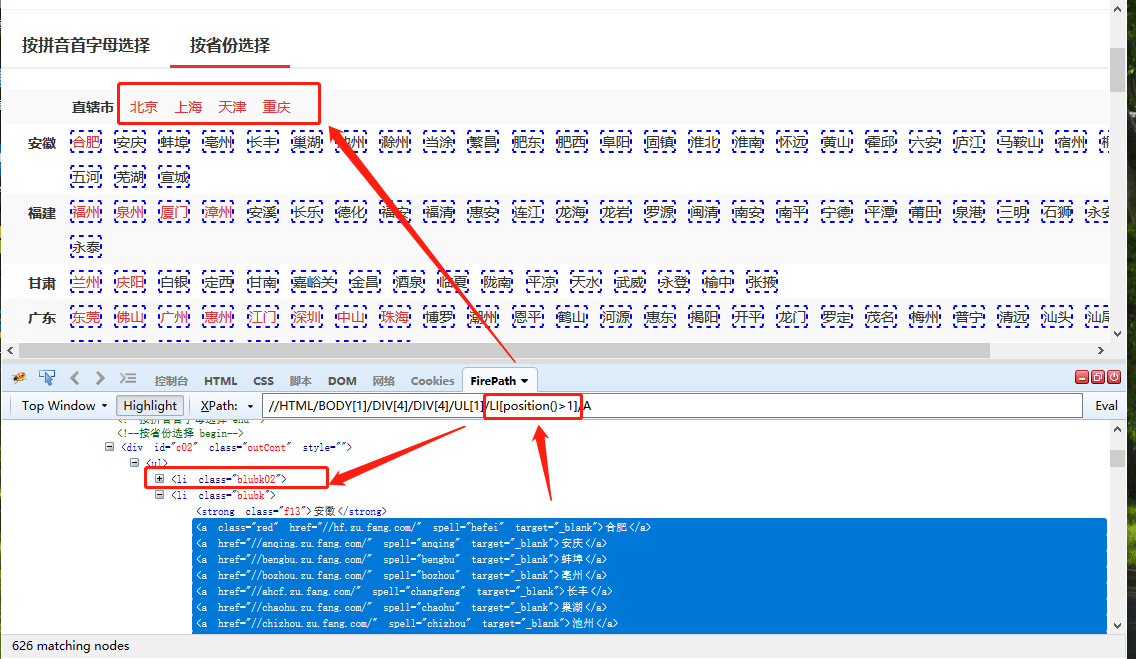
将循环列表的 XPath //HTML/BODY\[1]/DIV\[4]/DIV\[4]/UL\[1]/LI\[position()>1]/A ，复制到浏览器控制台中。可以看到，除第一行4个直辖市外，其他城市都定位到了。

在<a href="/docs/zh/academy/xpath/getting-started/xpath-functions" target="_blank" rel="noopener noreferrer">XPath函数</a>中，我们讲过position函数，它可以限制定位到的列表数。这里的\[position()>1]就将第一个li列表（4个直辖市的列表）筛掉了。我们想将4个直辖市也定位到，去掉\[position()>1]即可：//HTML/BODY\[1]/DIV\[4]/DIV\[4]/UL\[1]/LI/A。

<div style={{ textAlign: "center" }}>
  <img src="https://mintcdn.com/bazhuayu/LsqhRMjOG2uphnGy/assets/academy/xpath/relative-absolute-xpath/6535f39c22311.png?fit=max&auto=format&n=LsqhRMjOG2uphnGy&q=85&s=d70f27eceed6d18b2fc393c6bfbbfb8a" width="1136" height="659" data-path="assets/academy/xpath/relative-absolute-xpath/6535f39c22311.png" />
</div>

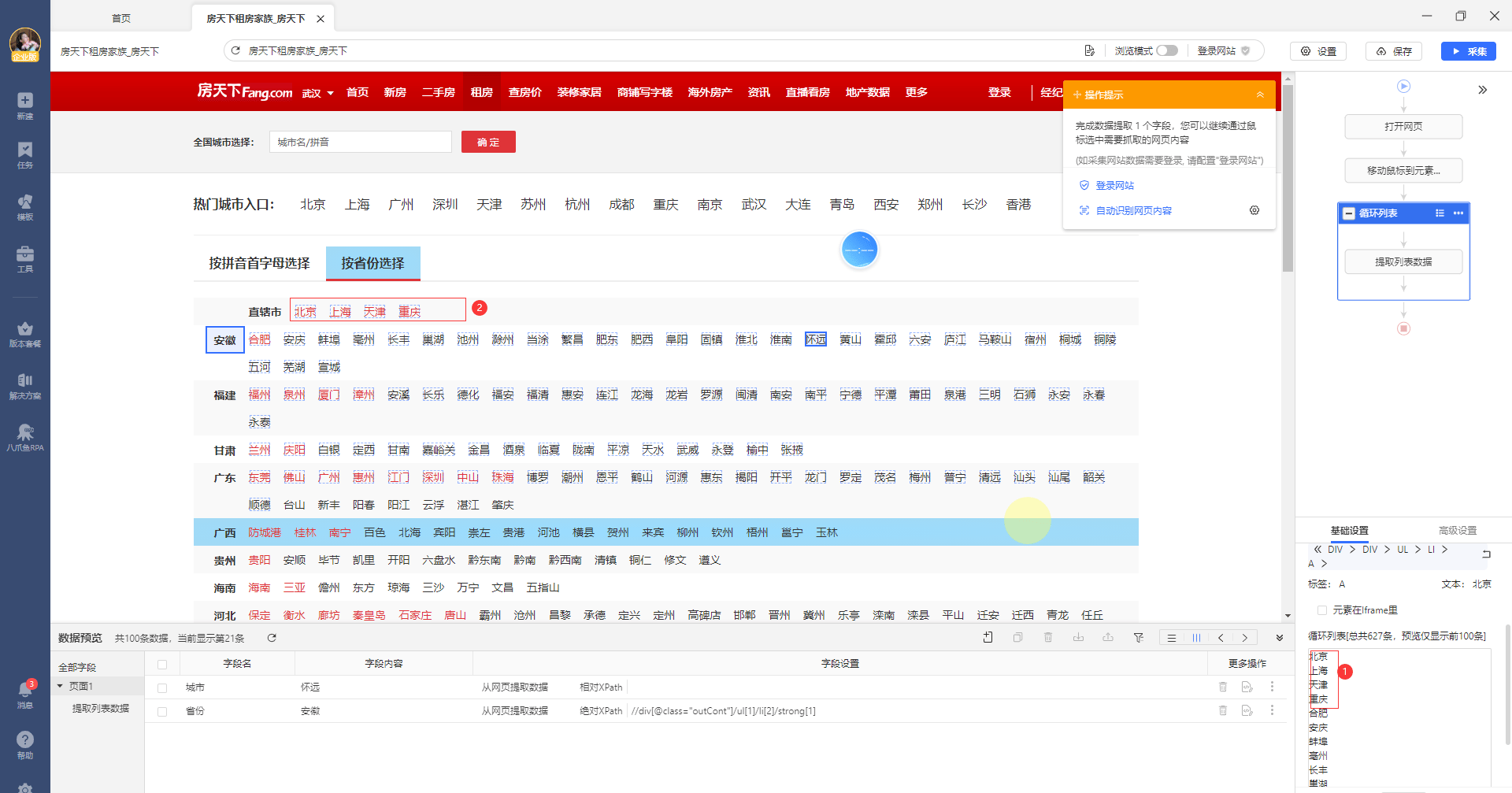
然后在八爪鱼中对循环框做相应修改。修改后可以看到，循环列表里面包含了第一行的4个直辖市，如下图。

<div style={{ textAlign: "center" }}>
  <img src="https://mintcdn.com/bazhuayu/LsqhRMjOG2uphnGy/assets/academy/xpath/relative-absolute-xpath/6535f3f2904bd.png?fit=max&auto=format&n=LsqhRMjOG2uphnGy&q=85&s=02f76e6e82b58500d4708b8a15d644b7" width="1920" height="1007" data-path="assets/academy/xpath/relative-absolute-xpath/6535f3f2904bd.png" />
</div>

Step3：再来解决始终定位到【安徽】这个省份的问题。

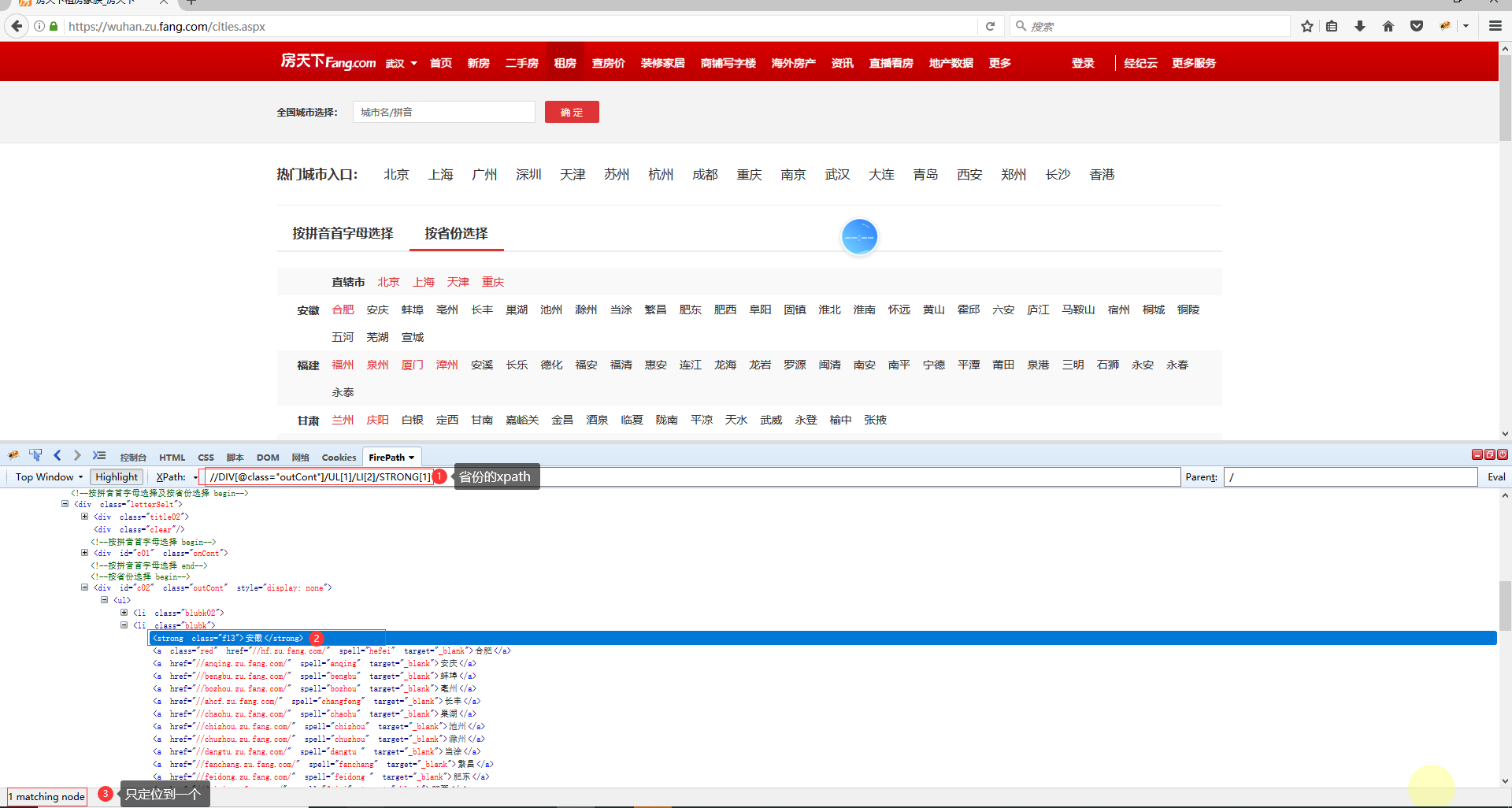
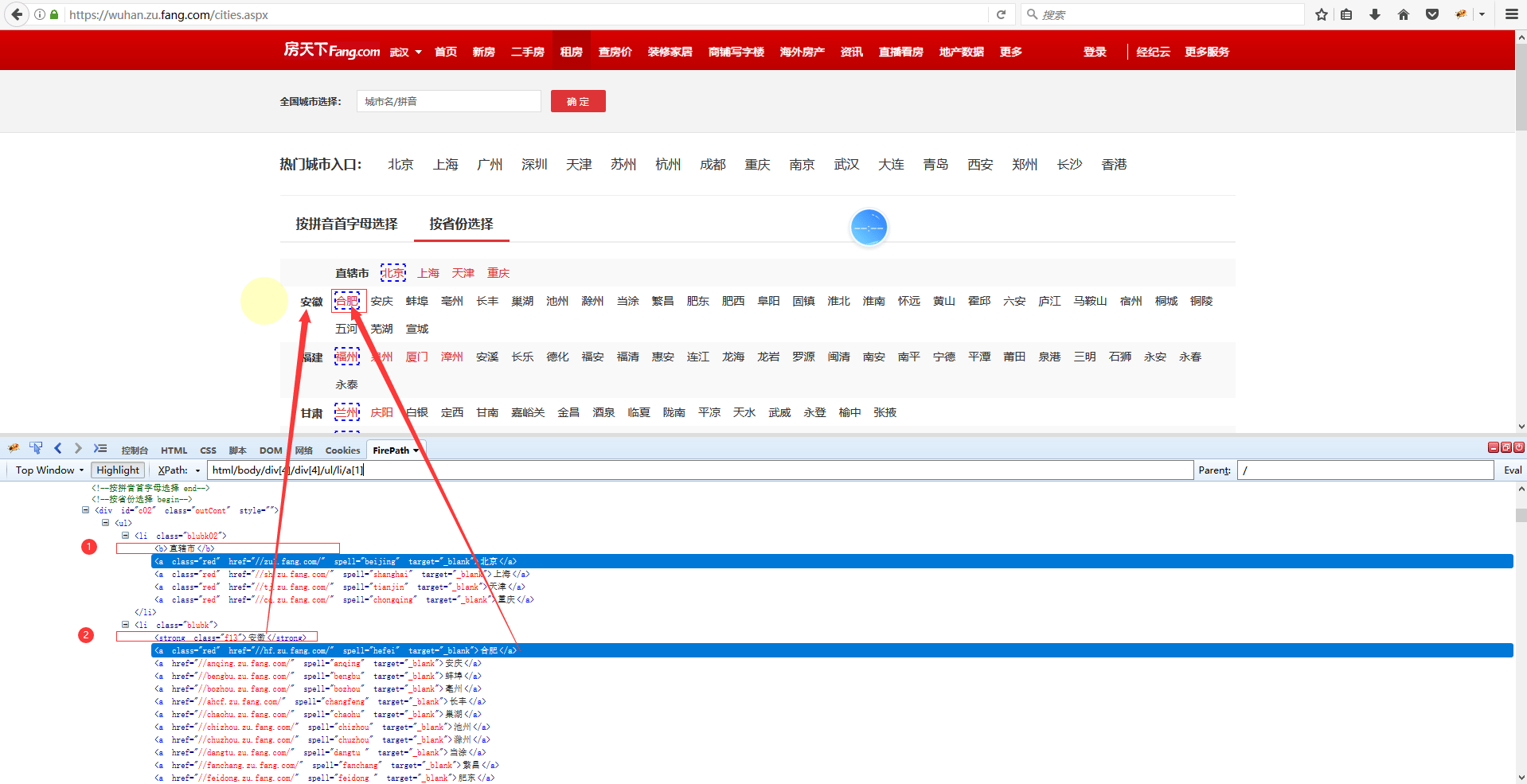
在提取【省份】时，八爪鱼自动生成的定位XPath为 //DIV\[@class="outCont"]/UL\[1]/LI\[2]/STRONG\[1]。将这条XPath复制到浏览器控制台中，可以看到只能固定提取【安徽】，不能与循环列表中的城市联动。所以当提取的城市发生变化时，省份不会随着城市的变化而变化。

<div style={{ textAlign: "center" }}>
  <img src="https://mintcdn.com/bazhuayu/LsqhRMjOG2uphnGy/assets/academy/xpath/relative-absolute-xpath/6535f4bc171ec.png?fit=max&auto=format&n=LsqhRMjOG2uphnGy&q=85&s=464566f604116f9a7b448c23f65a4430" width="1920" height="1026" data-path="assets/academy/xpath/relative-absolute-xpath/6535f4bc171ec.png" />
</div>

我们来观察省份和城市对应的源码。发现省份均为strong标签，城市均为a标签。直辖市为b标签，直辖市的4个城市均为a标签。

strong标签和b标签与a标签为同级标签，并都在a标签之前。

<div style={{ textAlign: "center" }}>
  <img src="https://mintcdn.com/bazhuayu/LsqhRMjOG2uphnGy/assets/academy/xpath/relative-absolute-xpath/6535f58d8178c.png?fit=max&auto=format&n=LsqhRMjOG2uphnGy&q=85&s=31d67c50ad4486c8924635e956de1870" width="1918" height="985" data-path="assets/academy/xpath/relative-absolute-xpath/6535f58d8178c.png" />
</div>

再回忆一下，我们是以城市，也就是a标签来建立循环列表的。如果需要省份与城市一一对应起来（包括直辖市与具体城市一一对应起来），需要用到上面学到的相对XPath知识。在这个示例中：

循环框的XPath：定位到列表项（所有城市）相对XPath：字段相对于循环框的位置（省份相对于城市的位置）循环框的XPath + 相对XPath = 每一个循环项外字段的XPath（省份的定位XPath）

根据源码特征，写出根据城市列表定位到省份（含直辖市）的定位XPath。城市列表定位XPath为/HTML/BODY\[1]/DIV\[4]/DIV\[4]/UL\[1]/LI/A，要定位a标签之前的同级元素，需用到preceding-sibling这个函数，在 <a href="/docs/zh/academy/xpath/getting-started/xpath-functions" target="_blank" rel="noopener noreferrer">XPath函数</a> 中有详细讲到。故：

(1) 【省份】相对于【城市】的XPath：

/HTML/BODY\[1]/DIV\[4]/DIV\[4]/UL\[1]/LI/A/preceding-sibling::strong\[1]

(2) 【直辖市】相对于【城市】的XPath：

/HTML/BODY\[1]/DIV\[4]/DIV\[4]/UL\[1]/LI/A/preceding-sibling::b\[1]

我们还可以进一步将这两条合并成一条，合并之后的结果是：

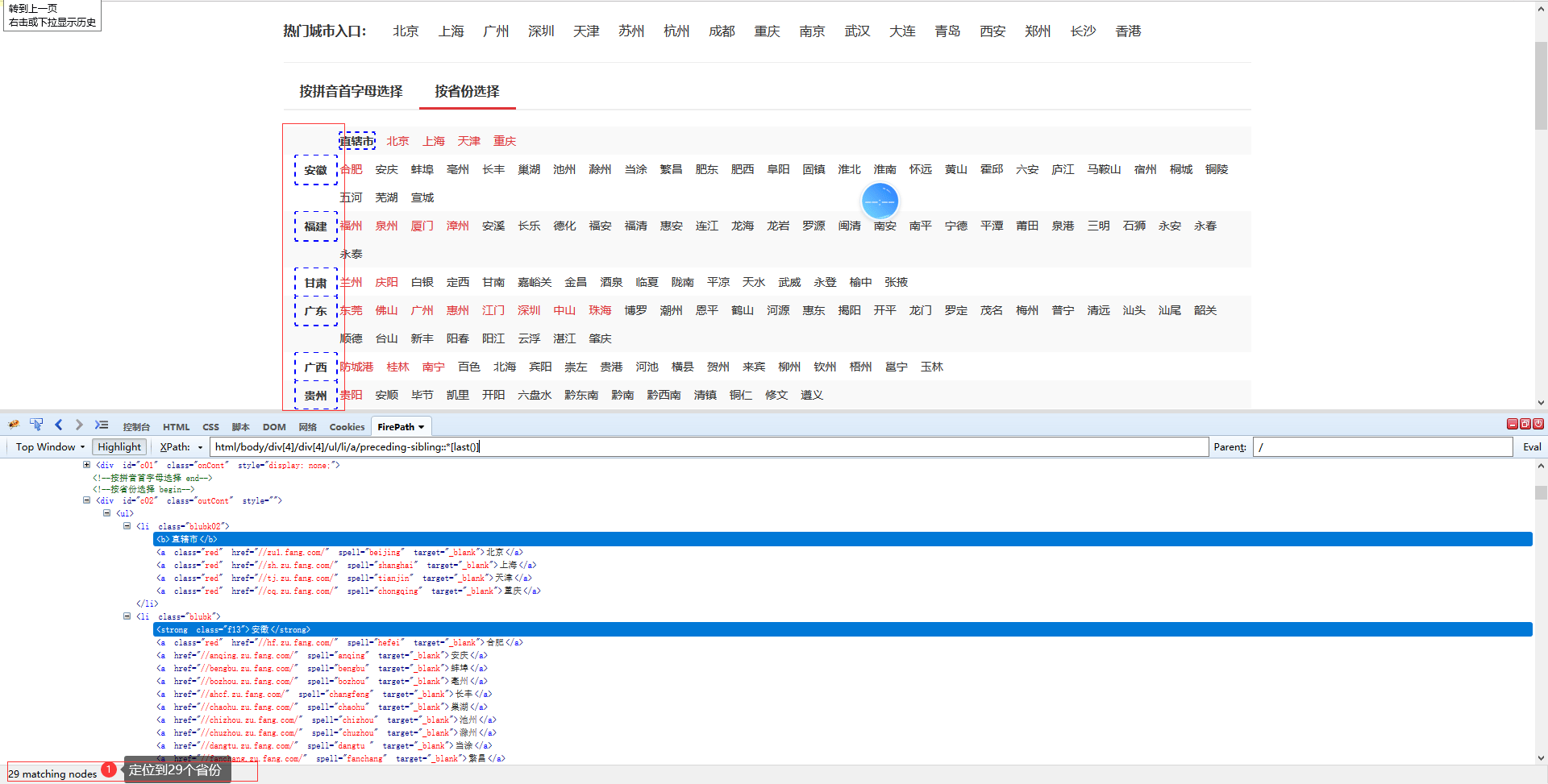
/HTML/BODY\[1]/DIV\[4]/DIV\[4]/UL\[1]/LI/A/preceding-sibling::\*\[last()]

\* 代表任意标签的意思，也就是strong标签或者b标签都可以用\*代替

last() 的意思是最后一个位置的标签。

整条XPath解释起来的意思就是，取城市列表（a标签）之前的最后一个同级标签（strong标签或者b标签），这样就适用于2种情况。

根据上面讲的知识，/HTML/BODY\[1]/DIV\[4]/DIV\[4]/UL\[1]/LI/A 为循环框XPath，/preceding-sibling::\*\[last()]为相对XPath。

在控制台里面验证下，定位到了所有省份（含直辖市）。

<div style={{ textAlign: "center" }}>
  <img src="https://mintcdn.com/bazhuayu/LsqhRMjOG2uphnGy/assets/academy/xpath/relative-absolute-xpath/6535f63b0581a.png?fit=max&auto=format&n=LsqhRMjOG2uphnGy&q=85&s=e3bf01592258587a0648701a3acfa116" width="1920" height="973" data-path="assets/academy/xpath/relative-absolute-xpath/6535f63b0581a.png" />
</div>

最后，在八爪鱼中做相应修改。

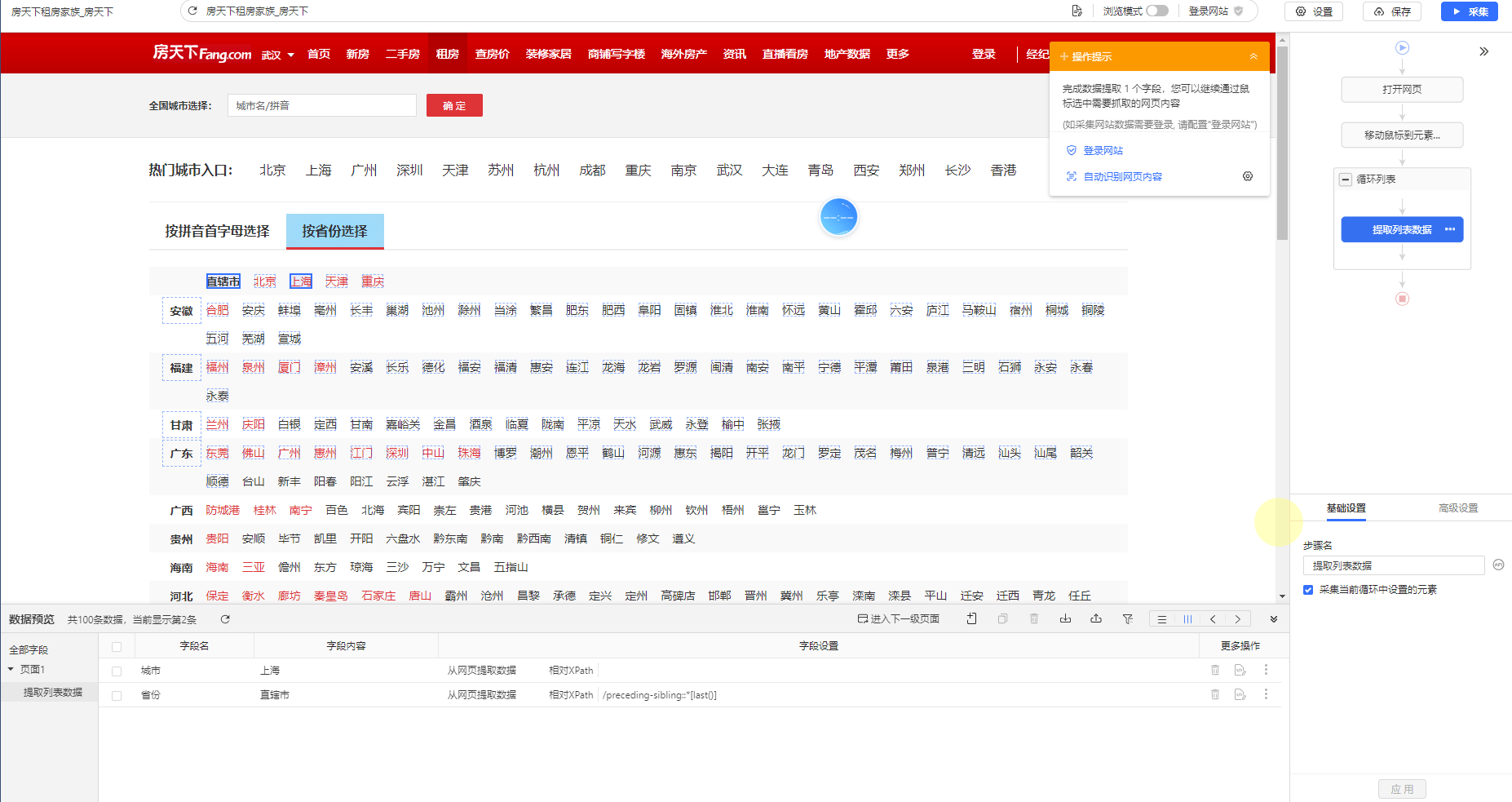
在纵向字段布局下，找到字段【省份】，点击【绝对Xpath】，切换为相对xpath，双击【xpath路径输入框】，输入我们写好的相对XPath：/preceding-sibling::\*\[last()] ，最后回车保存。

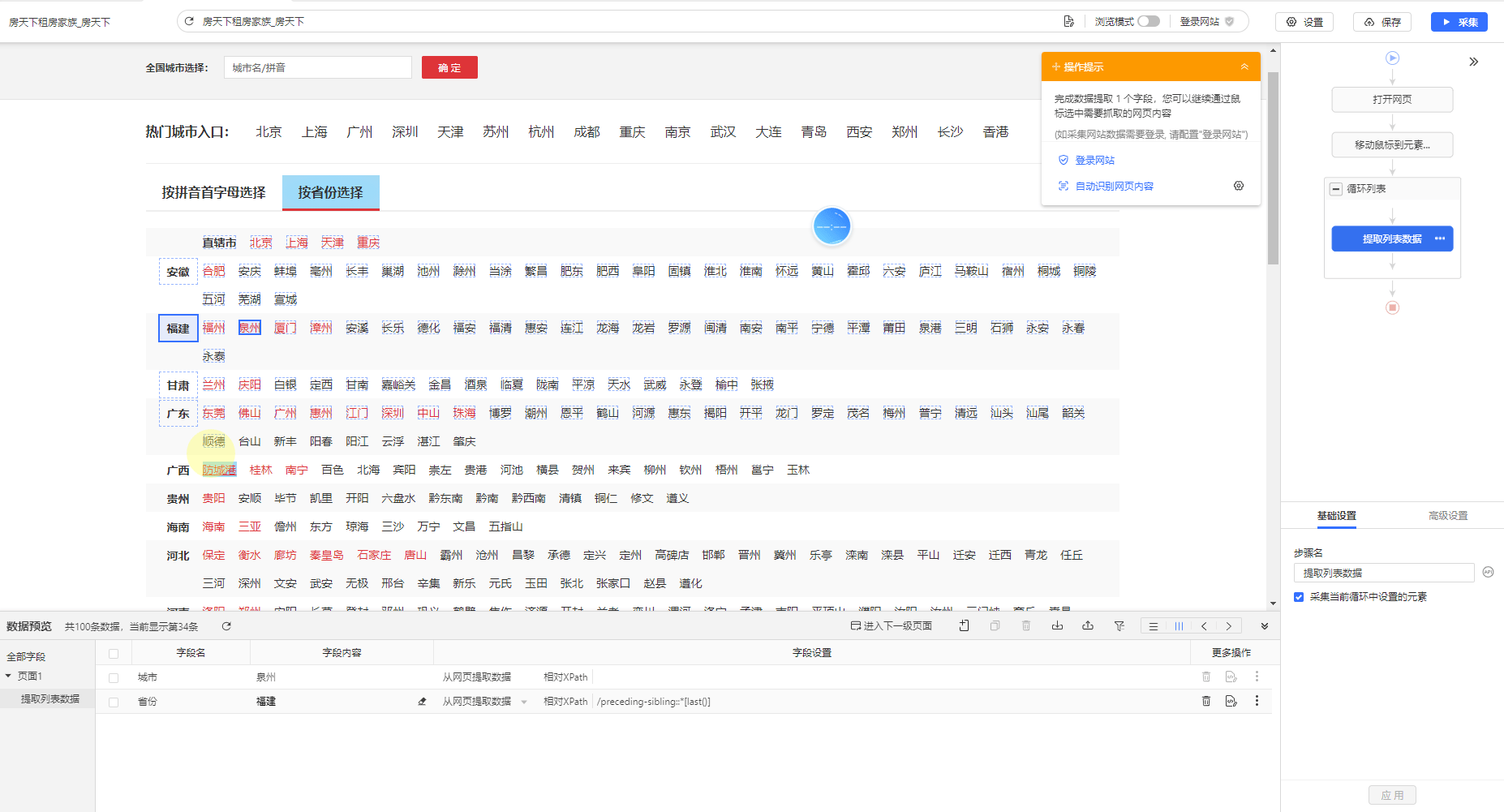
手动执行规则，循环列表分别切换成省份和直辖市，检查验证，已能联动，正确提取到相应数据。

上海-直辖市：

<div style={{ textAlign: "center" }}>
  <img src="https://mintcdn.com/bazhuayu/LsqhRMjOG2uphnGy/assets/academy/xpath/relative-absolute-xpath/65360fe289d7e.png?fit=max&auto=format&n=LsqhRMjOG2uphnGy&q=85&s=14f77db510b0ece0903b82b63d95c2cb" width="1854" height="983" data-path="assets/academy/xpath/relative-absolute-xpath/65360fe289d7e.png" />
</div>

泉州-福建：

<div style={{ textAlign: "center" }}>
  <img src="https://mintcdn.com/bazhuayu/LsqhRMjOG2uphnGy/assets/academy/xpath/relative-absolute-xpath/65360fccb6108.png?fit=max&auto=format&n=LsqhRMjOG2uphnGy&q=85&s=04c0bccbcc2191c18c74d12d7c811db7" width="1854" height="1001" data-path="assets/academy/xpath/relative-absolute-xpath/65360fccb6108.png" />
</div>

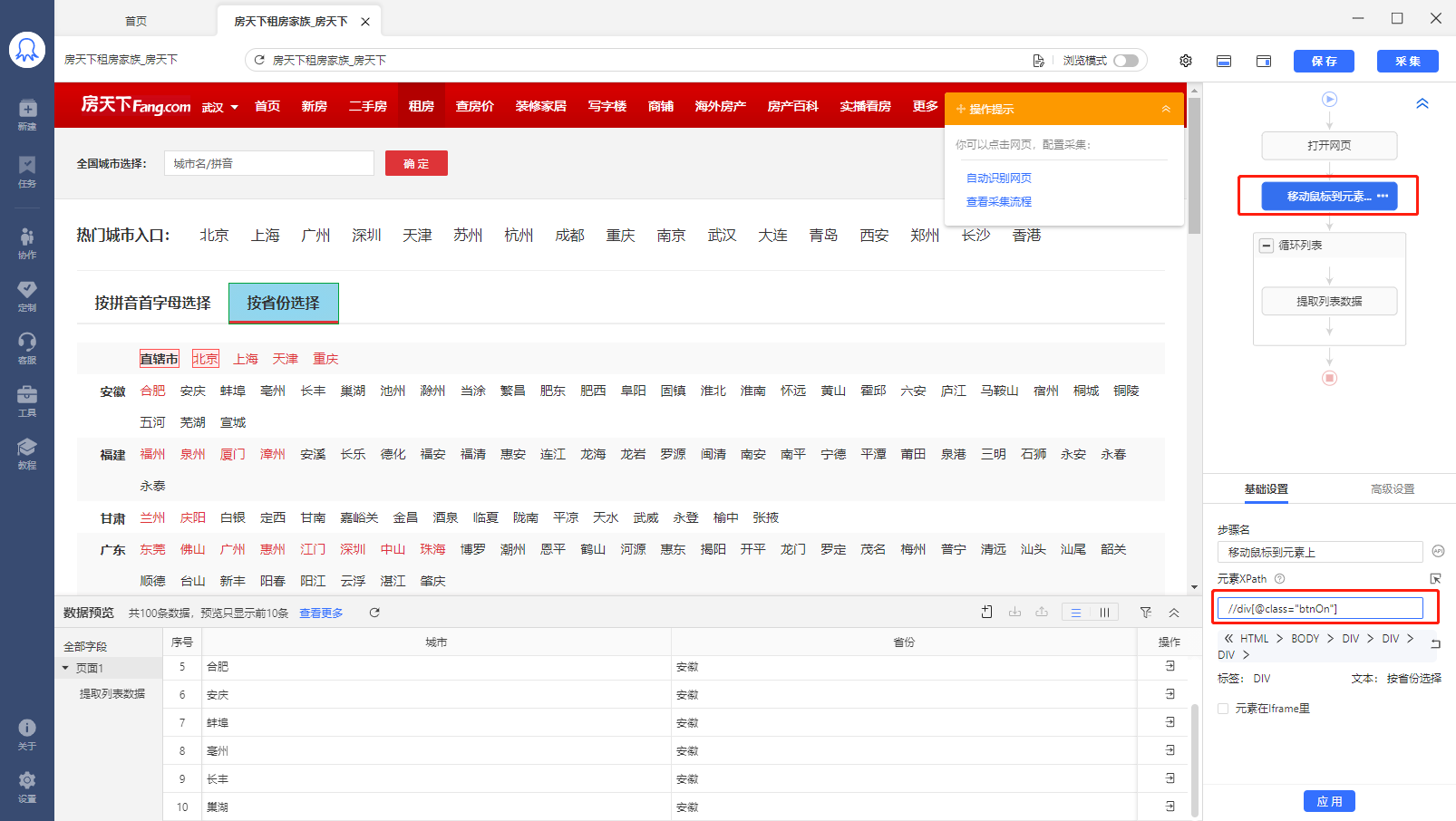
Step4：再来解决鼠标无法正确移动到【按省份选择】元素：

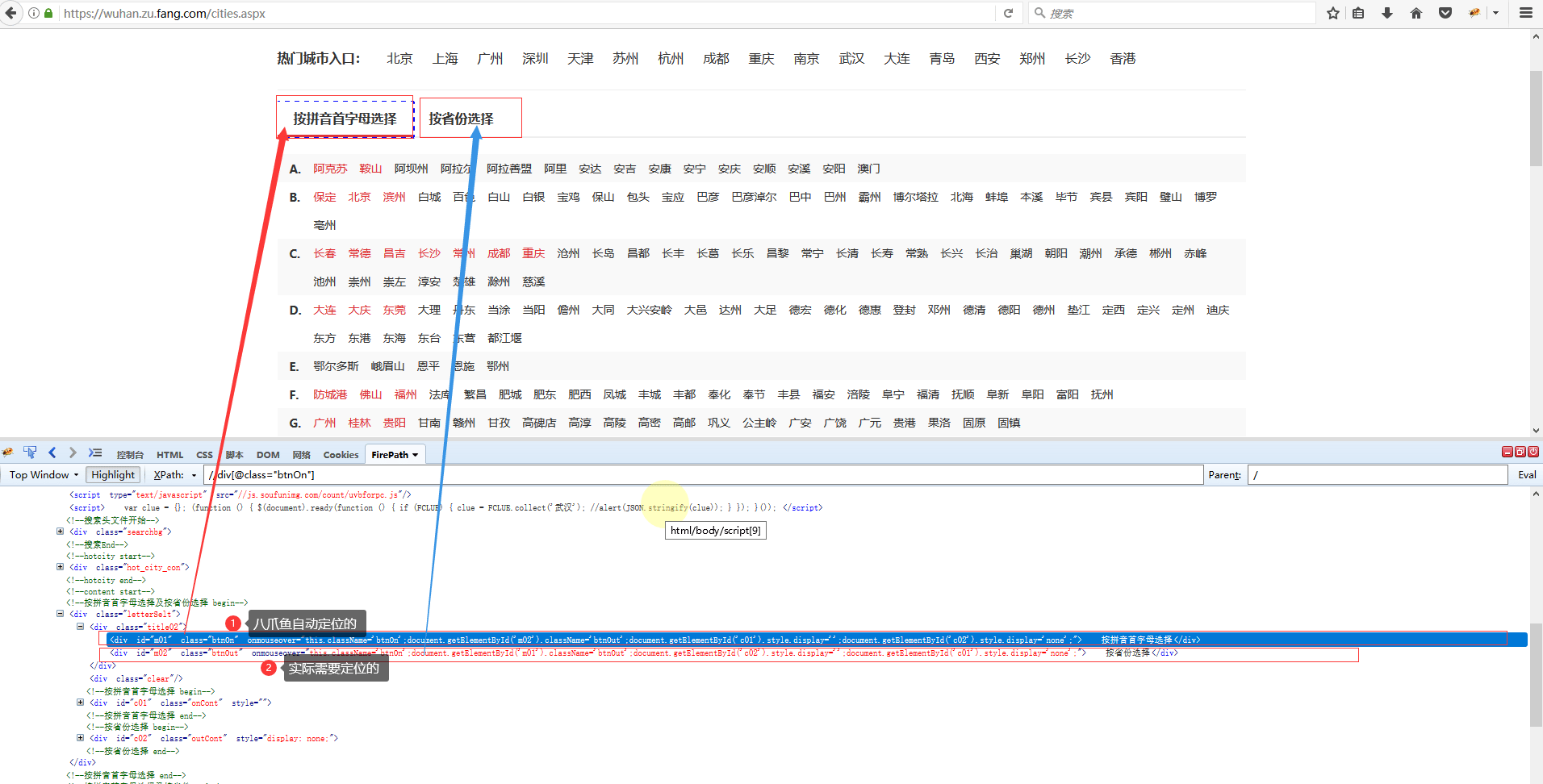
（1）在八爪鱼里面看一下鼠标移动到元素上的xpath为：//div\[@class="btnOn"]，把这个复制到浏览器控制台里面进行定位

<div style={{ textAlign: "center" }}>
  <img src="https://mintcdn.com/bazhuayu/LsqhRMjOG2uphnGy/assets/academy/xpath/relative-absolute-xpath/653611bbd7c2e.png?fit=max&auto=format&n=LsqhRMjOG2uphnGy&q=85&s=a08069c2cce697e3cb699362b246c60f" width="1606" height="906" data-path="assets/academy/xpath/relative-absolute-xpath/653611bbd7c2e.png" />
</div>

<div style={{ textAlign: "center" }}>
  <img src="https://mintcdn.com/bazhuayu/LsqhRMjOG2uphnGy/assets/academy/xpath/relative-absolute-xpath/653611b023603.png?fit=max&auto=format&n=LsqhRMjOG2uphnGy&q=85&s=72af7ec261d6c26be02170c0ecf4eb31" width="1912" height="972" data-path="assets/academy/xpath/relative-absolute-xpath/653611b023603.png" />
</div>

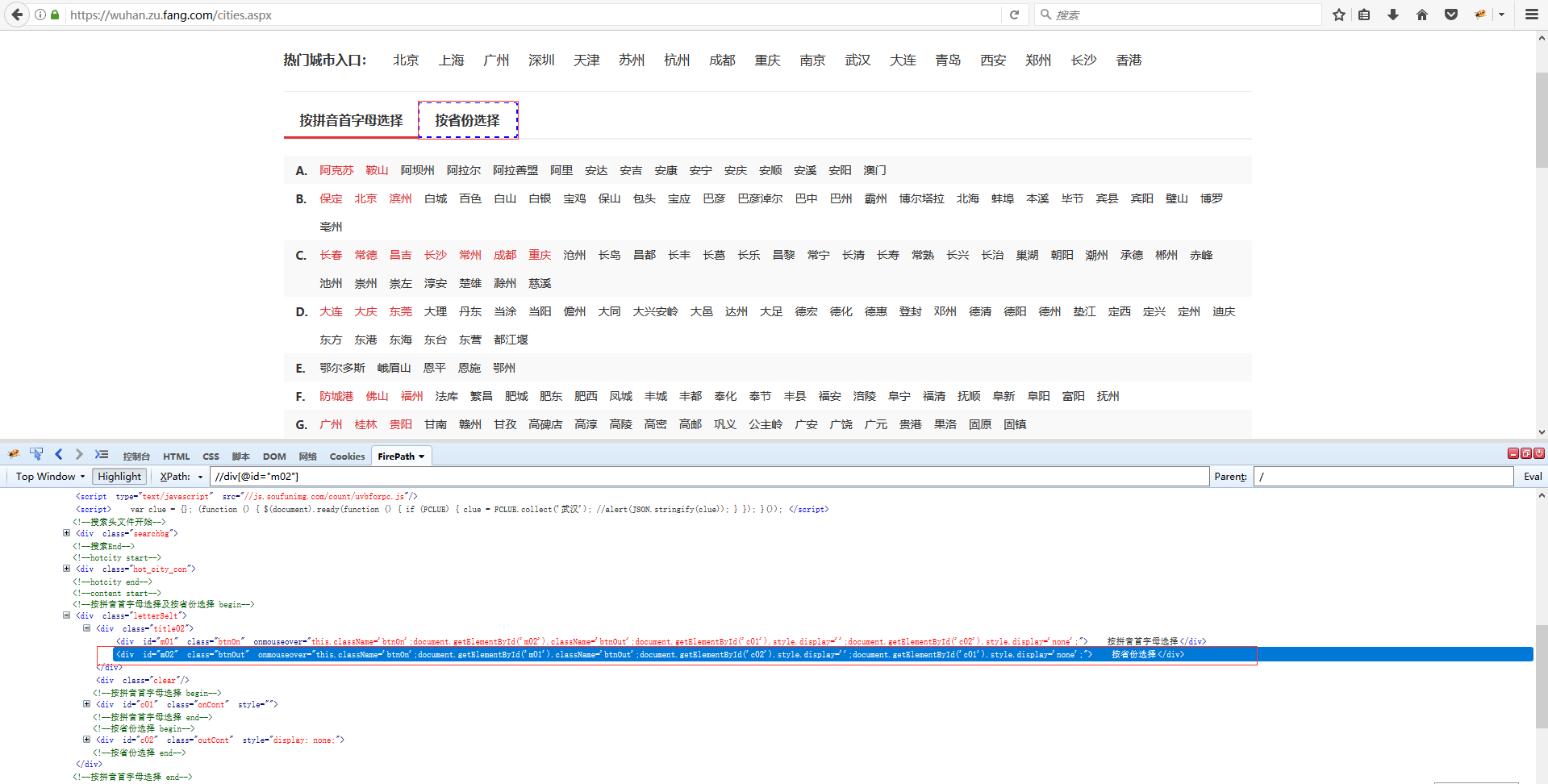
可以看到，定位到的是【按拼音首字母选择】按钮，观察源码可以看到实际要定位的是下面这个div标签，我们通过id值写出这个标签的xpath为：//div\[@id="m02"]，在控制台里面进行定位，发现正确。

然后，在八爪鱼里面找到这个鼠标移动到元素步骤，将这个正确的xpath：//div\[@id="m02"]换进去，手动执行正常：

<div style={{ textAlign: "center" }}>
  <img src="https://mintcdn.com/bazhuayu/LsqhRMjOG2uphnGy/assets/academy/xpath/relative-absolute-xpath/653611fb17276.png?fit=max&auto=format&n=LsqhRMjOG2uphnGy&q=85&s=679c6d66add86b7ccf5591793abad0af" width="1919" height="972" data-path="assets/academy/xpath/relative-absolute-xpath/653611fb17276.png" />
</div>

启动【本地采集】，看一下采集结果，可以看到，省份（含直辖市）与城市一一对应。

<div style={{ textAlign: "center" }}>
  <video className="tutorial-animation" controls preload="none" playsInline poster="/assets/academy/xpath/relative-absolute-xpath/6536127313c77.webp" aria-label="教程演示动画">
    <source src="https://mintcdn.com/bazhuayu/71s0_euLSXSIp3C3/assets/academy/xpath/relative-absolute-xpath/6536127313c77.mp4?fit=max&auto=format&n=71s0_euLSXSIp3C3&q=85&s=8fd95b1f62126c1fbdadaaeed910e15e" type="video/mp4" data-path="assets/academy/xpath/relative-absolute-xpath/6536127313c77.mp4" />

    您的浏览器不支持视频播放，请更新浏览器后重试。
  </video>
</div>

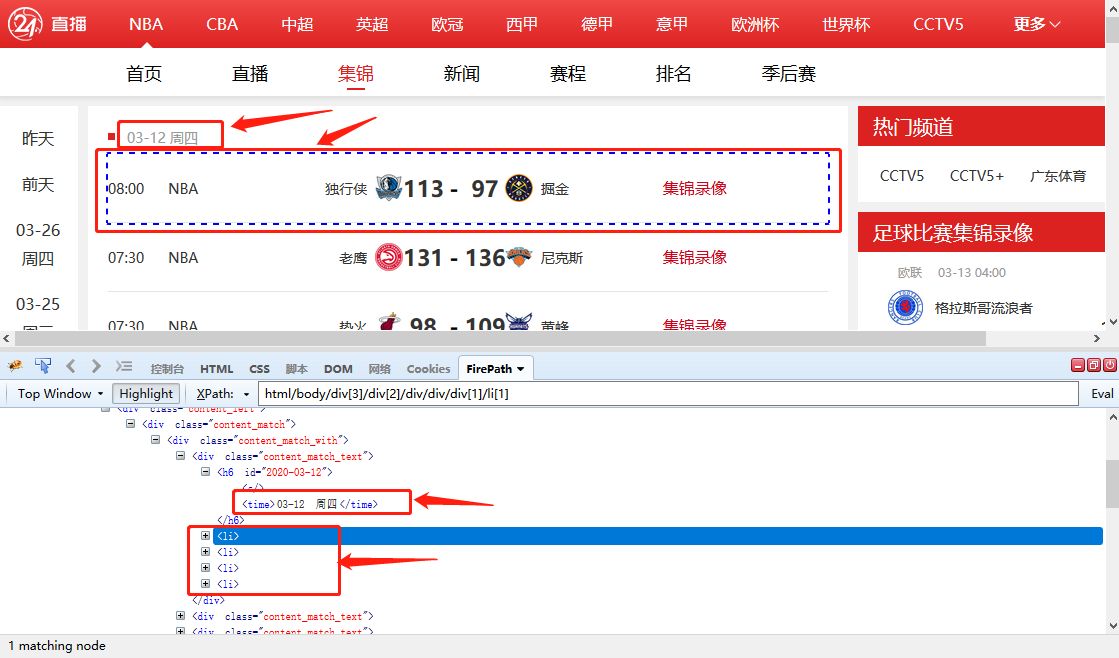
当要用相对XPath采集循环外的数据时，需特别注意，只适用于提取循环外面单个的数据（只有一个数据）。不适用于循环外也是列表，有多行数据的情况。

实例1：循环外为单个数据，适用

网址：[https://www.24zbw.com/playback/nba/](https://www.24zbw.com/playback/nba/)

日期星期是写在一起的单个数据，以所有的赛事，也就是li标签做循环，然后提取循环外，li标签前面一个的h6标签，下面一个层级的time标签即可。

<div style={{ textAlign: "center" }}>
  <img src="https://mintcdn.com/bazhuayu/LsqhRMjOG2uphnGy/assets/academy/xpath/relative-absolute-xpath/653612ad661bd.png?fit=max&auto=format&n=LsqhRMjOG2uphnGy&q=85&s=9c42814901459c0be0c4cc3a1287ff5e" width="1119" height="658" data-path="assets/academy/xpath/relative-absolute-xpath/653612ad661bd.png" />
</div>

实例2：循环外为也为列表，多个数据，不适用

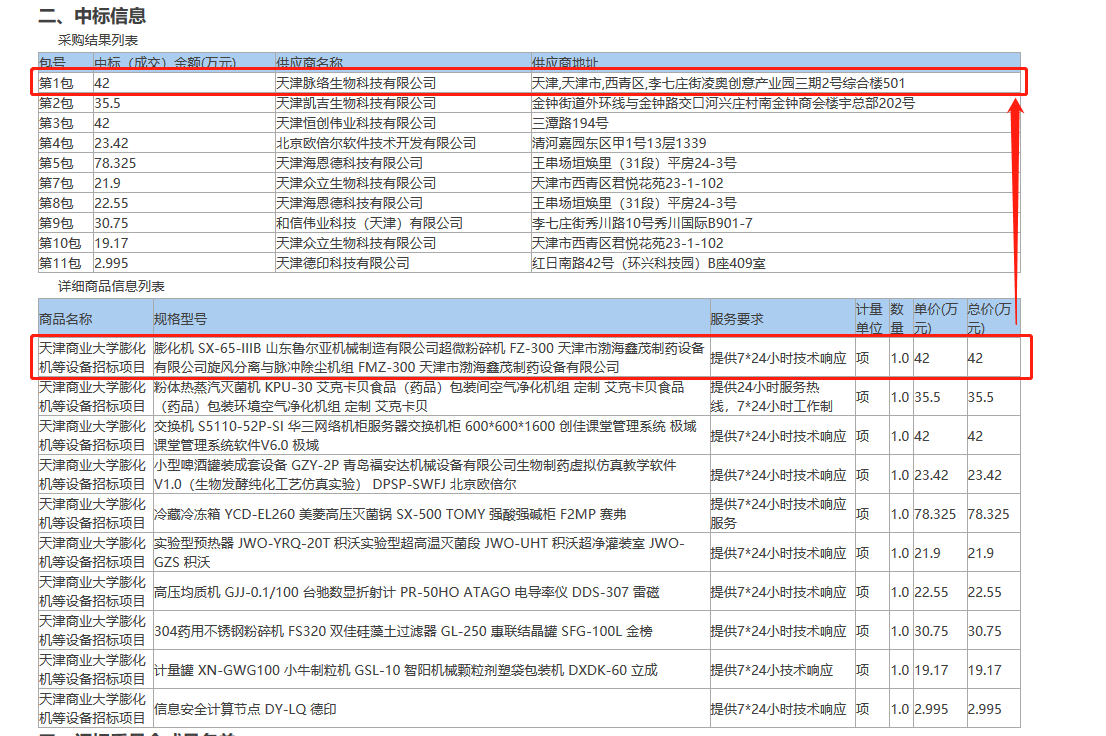
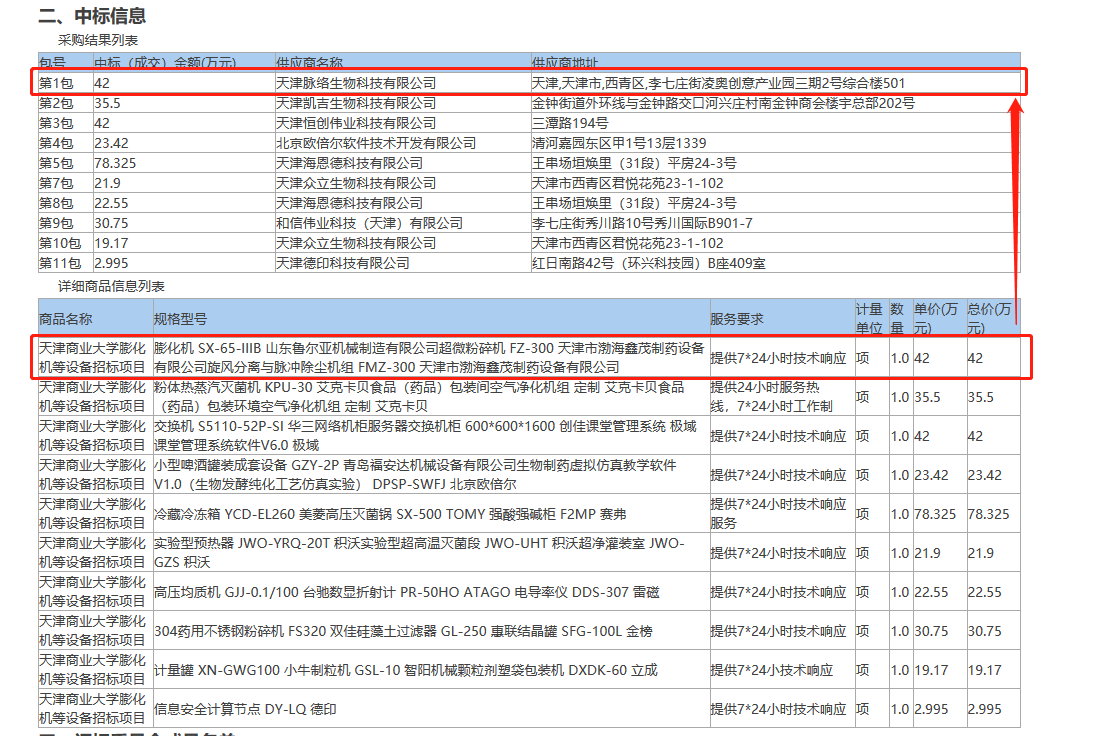
网址：[http://www.ccgp-tianjin.gov.cn/portal/documentView.do?method=view\&id=144080253\&ver=2](http://www.ccgp-tianjin.gov.cn/portal/documentView.do?method=view\&id=144080253\&ver=2)

上下2个表格，下面表格的数据和上面表格的数据是按顺序一一对应。要把上下2个表并且按对应关系采集下来，是做不到的。因为上面一个表采集需要创建一个循环，下面一个表采集也需要创建一个循环，就会有2个循环，但是循环与循环之间是没办法产生联动效果，八爪鱼暂时还不支持循环与循环的联动。

<div style={{ textAlign: "center" }}>
  <img src="https://mintcdn.com/bazhuayu/LsqhRMjOG2uphnGy/assets/academy/xpath/relative-absolute-xpath/653612c52526b.png?fit=max&auto=format&n=LsqhRMjOG2uphnGy&q=85&s=3f654661fe62f89ba205fb1df3a09091" width="1106" height="736" data-path="assets/academy/xpath/relative-absolute-xpath/653612c52526b.png" />
</div>

<div style={{ textAlign: "center" }}>
  <img src="https://mintcdn.com/bazhuayu/LsqhRMjOG2uphnGy/assets/academy/xpath/relative-absolute-xpath/653612cc40b73.png?fit=max&auto=format&n=LsqhRMjOG2uphnGy&q=85&s=bc4c49c4cd7c2342b4c0a86e48dfac00" width="1106" height="736" data-path="assets/academy/xpath/relative-absolute-xpath/653612cc40b73.png" />
</div>

编辑：FAN