> ## Documentation Index
> Fetch the complete documentation index at: https://www.bazhuayu.com/docs/llms.txt
> Use this file to discover all available pages before exploring further.

# 云排错（团队版及以上参考）

**云采集排错教程**

本教程针对本地采集有数据，云采集没有数据的排错教程，如果本地采集没有数据，请先参考<a href="/docs/zh/academy/troubleshooting/local-debug" target="_blank" rel="noopener noreferrer">本地采集排错教程</a>

本地采集有数据，云采集没有数据主要原因为以下几点：

**1.防采集**

**2.网站或网速原因**

**3.网络环境不同，源码有变，原xpath定位不准**

**4.网站只允许单浏览器或单IP登录**

## 一、防采集

**防采集主要是以下三类：IP被封禁止访问、出现验证码、云上需要登录**

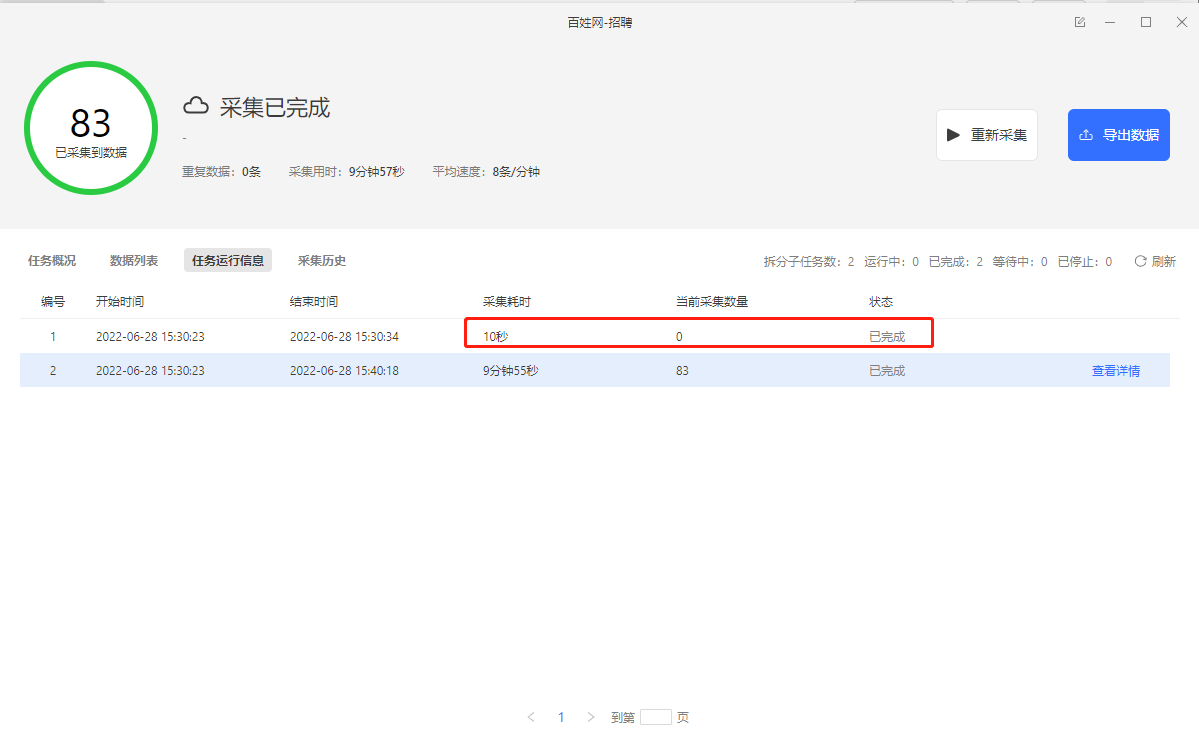
针对以上三种情况，都可以通过采集网页的html源码进行观察，这里我们以百姓网招聘数据采集为例。如下图1所示启动云采集后子任务出现采集为0的情况。

<div style={{ textAlign: "center" }}>
  <img src="https://mintcdn.com/bazhuayu/Yt154rSVqBF4hhhV/assets/academy/troubleshooting/cloud-debug/65b08920f3c55.png?fit=max&auto=format&n=Yt154rSVqBF4hhhV&q=85&s=8209a2ad4d99ae297747b8705378d7c7" alt="cloud-debug" width="1199" height="736" data-path="assets/academy/troubleshooting/cloud-debug/65b08920f3c55.png" />
</div>

这时候我们可以采集网页源码观察网站在云上打开的情况去排查云采集为什么采集不到数据。

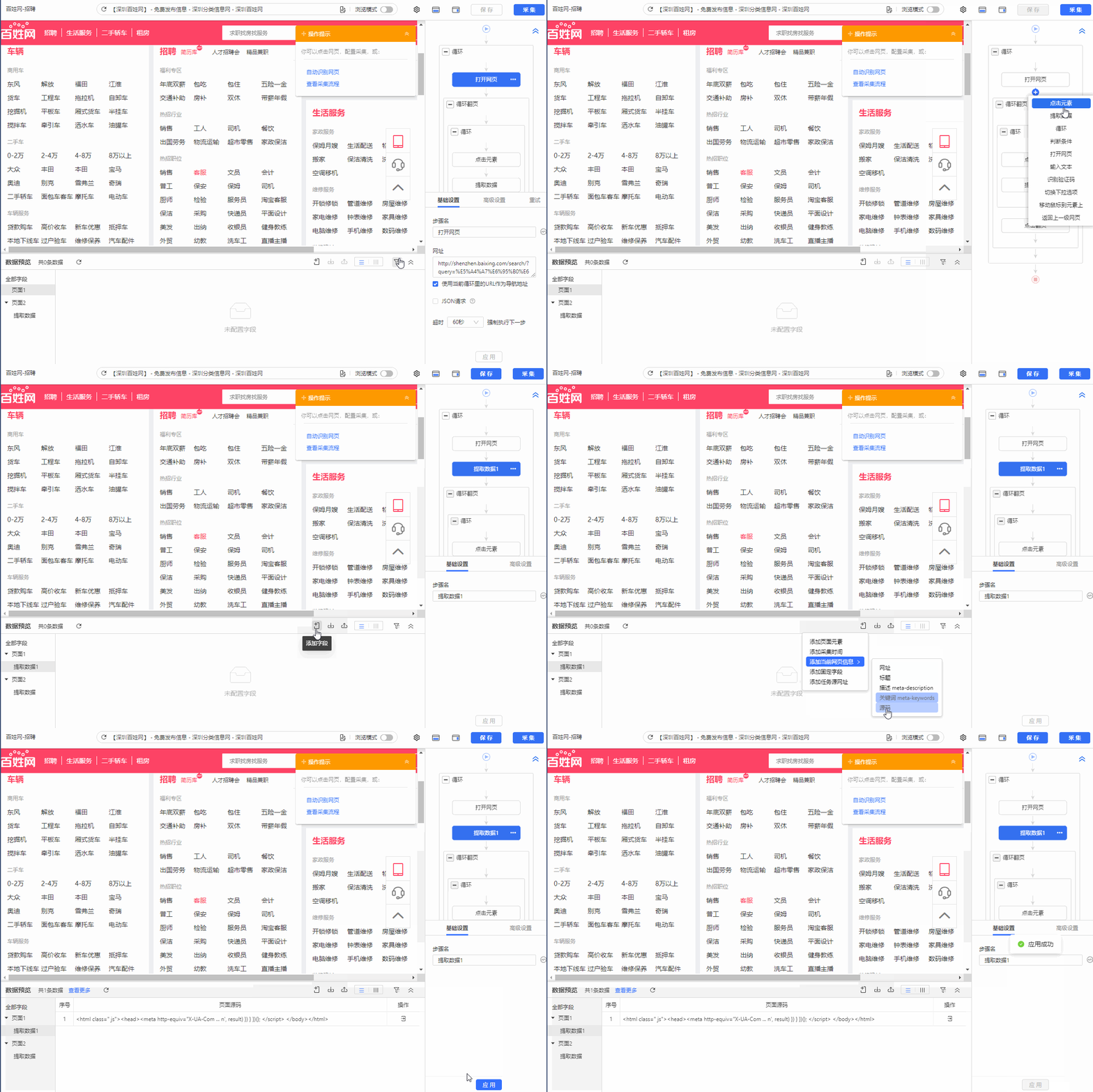
采集网页源码的具体步骤如下：

1.在规则对应位置增加【提取数据】步骤，然后再添加字段采集当前网页的源码。

<div style={{ textAlign: "center" }}>
  <img src="https://mintcdn.com/bazhuayu/Yt154rSVqBF4hhhV/assets/academy/troubleshooting/cloud-debug/65b089211e3ee.gif?s=b780f637c188fe8d78c1af236c969a9a" alt="cloud-debug" width="1200" height="800" data-path="assets/academy/troubleshooting/cloud-debug/65b089211e3ee.gif" />
</div>

2.然后启动云采集查看云采集数据，将采集到的源码复制粘贴到txt文件，然后另存为.html文件。

<div style={{ textAlign: "center" }}>
  <video className="tutorial-animation" controls preload="none" playsInline poster="/assets/academy/troubleshooting/cloud-debug/65b08921812af.webp" aria-label="cloud-debug">
    <source src="https://mintcdn.com/bazhuayu/pkgDs82YQ0xvErlV/assets/academy/troubleshooting/cloud-debug/65b08921812af.mp4?fit=max&auto=format&n=pkgDs82YQ0xvErlV&q=85&s=38004c64a36ec73ab80a1643aa61a31a" type="video/mp4" data-path="assets/academy/troubleshooting/cloud-debug/65b08921812af.mp4" />

    您的浏览器不支持视频播放，请更新浏览器后重试。
  </video>
</div>

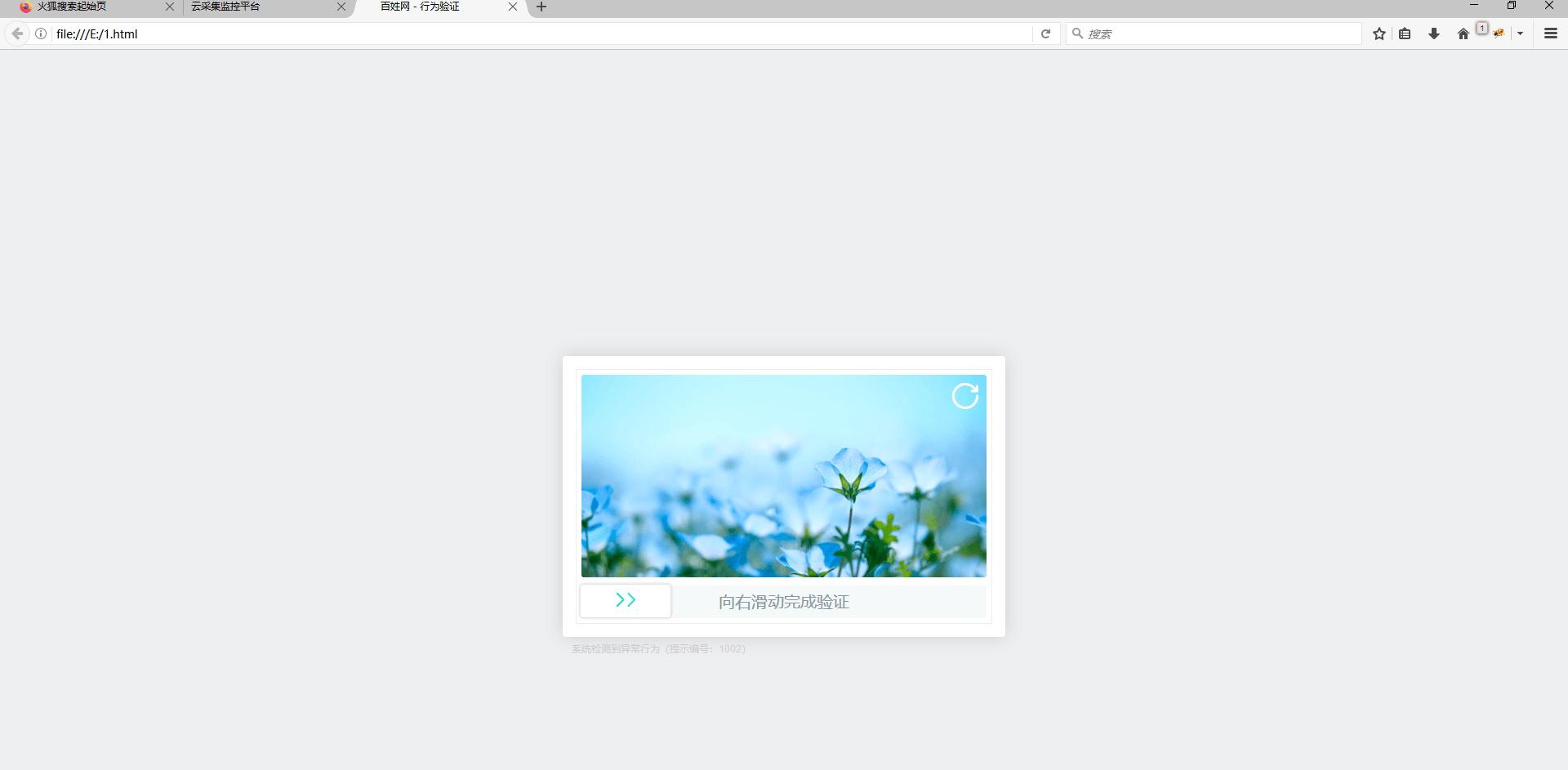
3.将另存的.html文件在浏览器中打开查看，如下图所示：

通过采集的源码在浏览器中打开可以查看到，云上采集的时候出现的滑块验证，从而导致采集不到数据。

<div style={{ textAlign: "center" }}>
  <img src="https://mintcdn.com/bazhuayu/Yt154rSVqBF4hhhV/assets/academy/troubleshooting/cloud-debug/65b0892154e46.png?fit=max&auto=format&n=Yt154rSVqBF4hhhV&q=85&s=1248cae6d6caefd45055e67245fbc998" alt="cloud-debug" width="1920" height="943" data-path="assets/academy/troubleshooting/cloud-debug/65b0892154e46.png" />
</div>

特别注意：

a.如果是IP被封禁止访问、云上需要登录的情况，也可以通过以上方法采集网页源码后在浏览器里查看可以查看到。ip被封  可以尝试设置切换ip尝试采集。

b.如果是需要登录则在规则里设置登录，具体请查看教程 <a href="https://www.bazhuayu.com/tutorial8/81dl" target="_blank" rel="noopener noreferrer">需要登录的网页（含登录时有验证码）</a>。

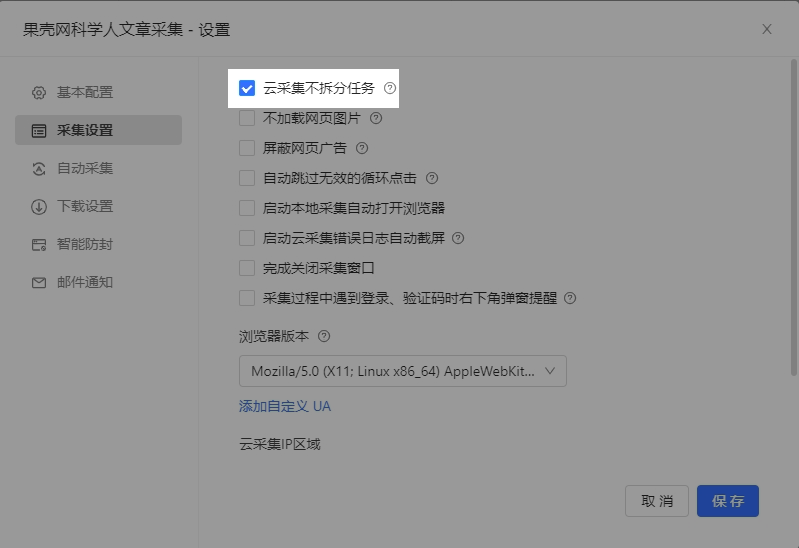
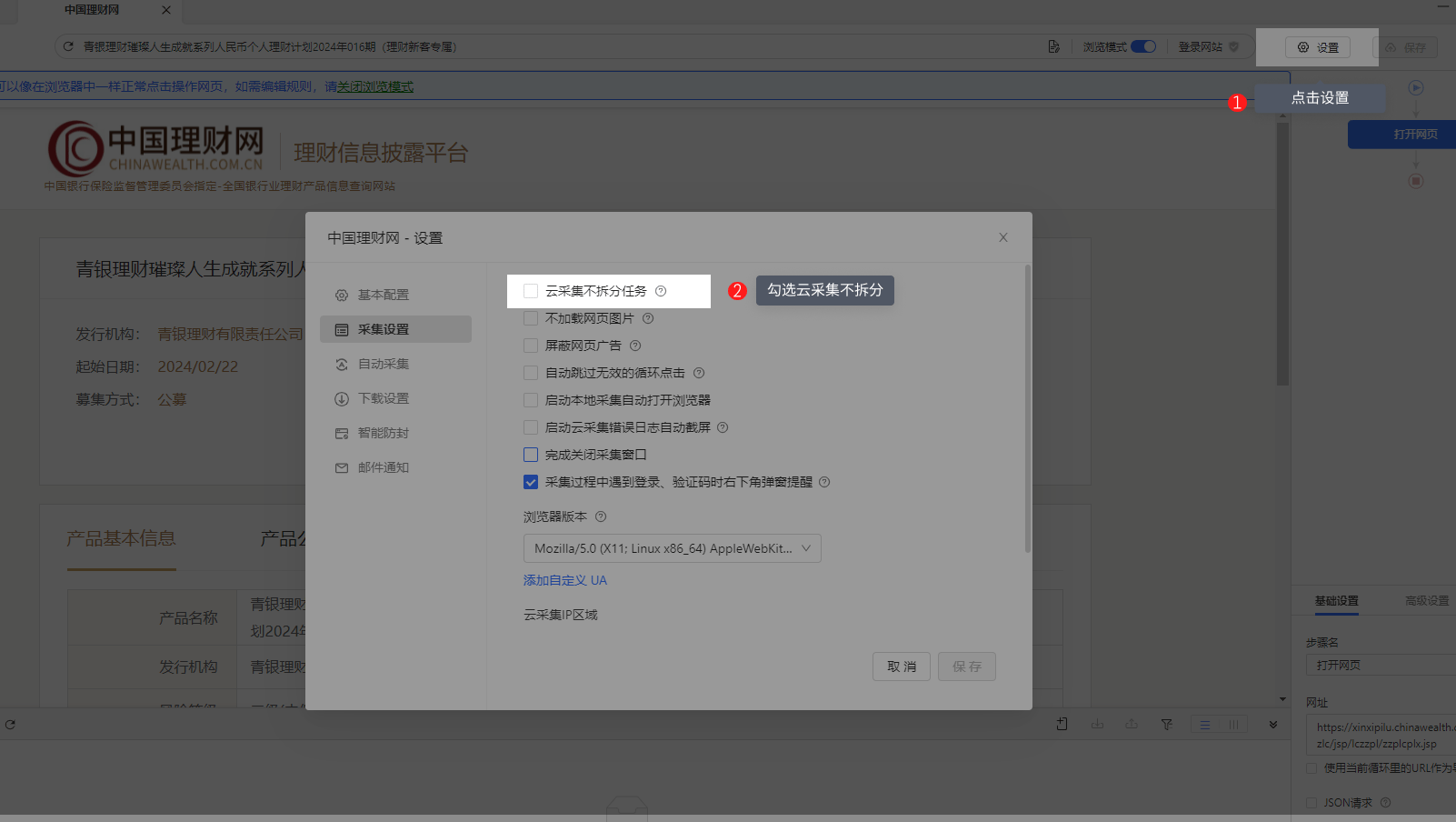
c.规则中使用了cookie登录，本地采集的时候可正常调用本地缓存的cookie。启动云采集后，云采集使用云端服务器节点，是新的ip，没有登录cookie，不能以登录状态打开要采集的网页，也需要重新设置登录的步骤。d.有的网站不支持多ip登录，此类网站的采集规则，需勾选【云采集不拆分任务】）

<div style={{ textAlign: "center" }}>
  <img src="https://mintcdn.com/bazhuayu/Yt154rSVqBF4hhhV/assets/academy/troubleshooting/cloud-debug/65b08921e63ac.png?fit=max&auto=format&n=Yt154rSVqBF4hhhV&q=85&s=3eb892fe7eb0a6399a803baa89fd7aef" alt="cloud-debug" width="799" height="548" data-path="assets/academy/troubleshooting/cloud-debug/65b08921e63ac.png" />
</div>

## 二、网站或网速原因

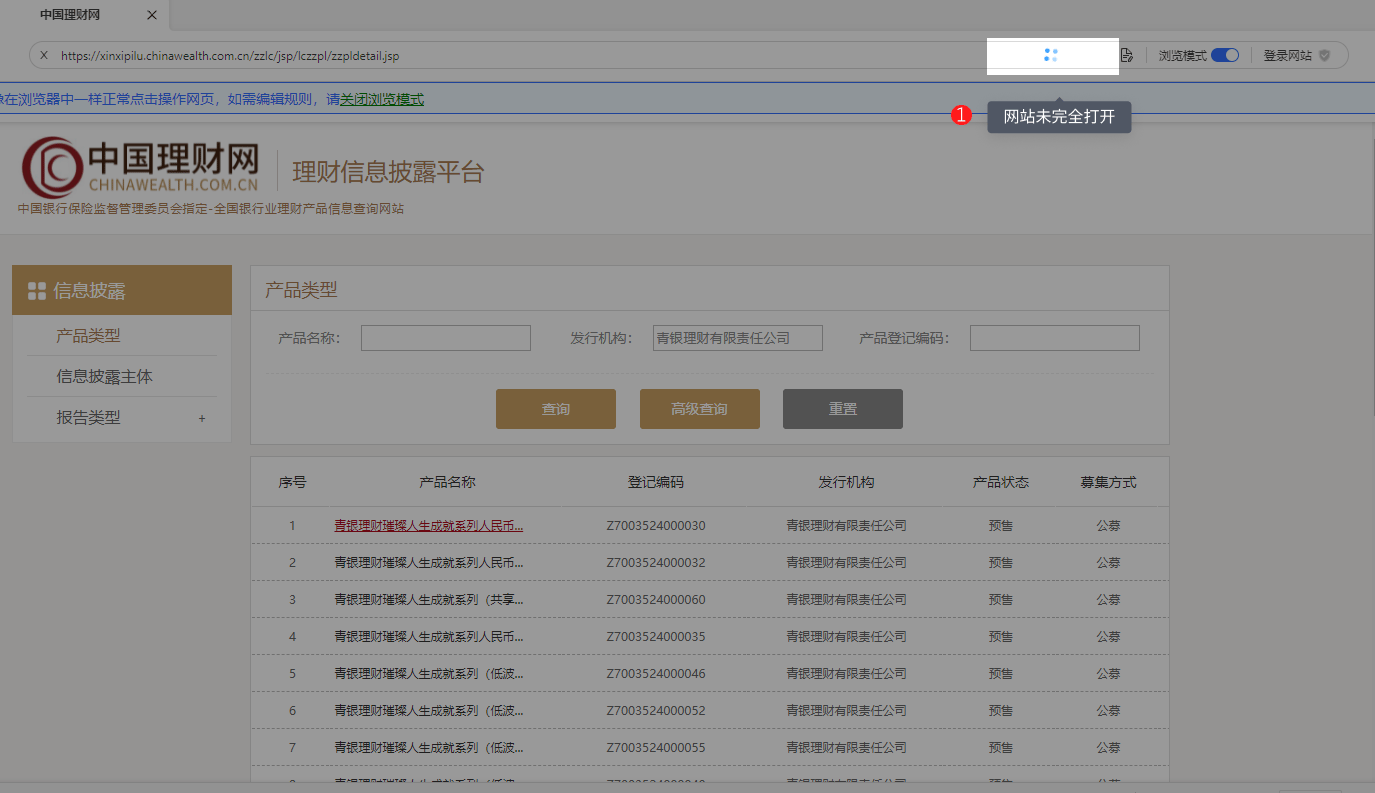
如果网站未完全打开，则显示下图高亮处：

<div style={{ textAlign: "center" }}>
  <img src="https://mintcdn.com/bazhuayu/Yt154rSVqBF4hhhV/assets/academy/troubleshooting/cloud-debug/65b0892136068.png?fit=max&auto=format&n=Yt154rSVqBF4hhhV&q=85&s=de95e2b1b5394f9260034bda45192a78" alt="cloud-debug" width="1375" height="793" data-path="assets/academy/troubleshooting/cloud-debug/65b0892136068.png" />
</div>

如上图，我们可以明显看到，网站网页URL明显有红框处在转的图标 <img src="https://mintcdn.com/bazhuayu/Yt154rSVqBF4hhhV/assets/academy/troubleshooting/cloud-debug/65b0892120424.png?fit=max&auto=format&n=Yt154rSVqBF4hhhV&q=85&s=7a20476ae4a4f0f179ebfc25a387a480" alt="" className="academy-inline-icon" width="38" height="36" data-path="assets/academy/troubleshooting/cloud-debug/65b0892120424.png" /> ：

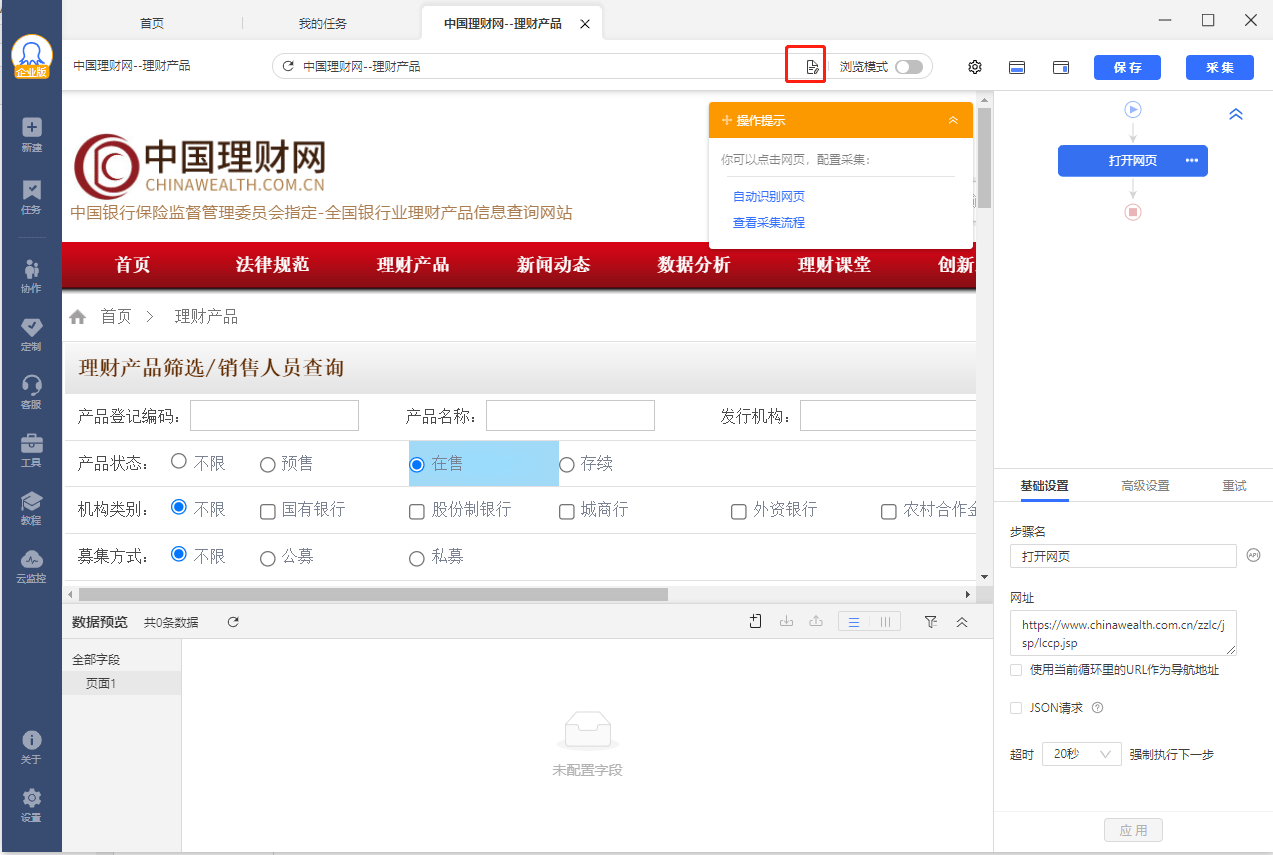
一个完全打开的网站，应该如下图所示：

<div style={{ textAlign: "center" }}>
  <img src="https://mintcdn.com/bazhuayu/Yt154rSVqBF4hhhV/assets/academy/troubleshooting/cloud-debug/65b089222ca0b.png?fit=max&auto=format&n=Yt154rSVqBF4hhhV&q=85&s=916d3ebb39ac10adc7ecfb38ce18e28d" alt="cloud-debug" width="1273" height="855" data-path="assets/academy/troubleshooting/cloud-debug/65b089222ca0b.png" />
</div>

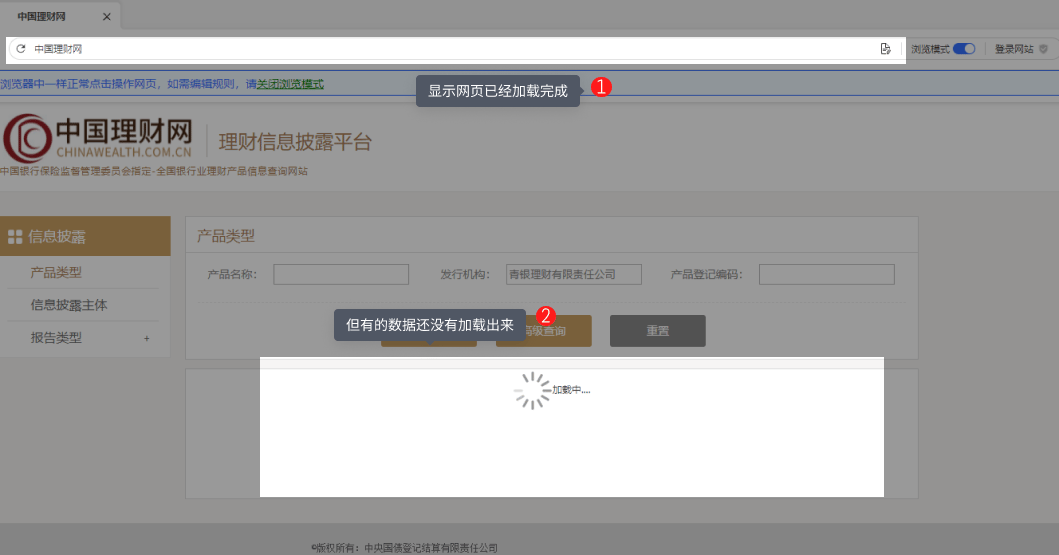
有时候一个网页，即便完全打开了，列表数据也要延迟几秒才能加载出来

<div style={{ textAlign: "center" }}>
  <img src="https://mintcdn.com/bazhuayu/Yt154rSVqBF4hhhV/assets/academy/troubleshooting/cloud-debug/65b089225a32c.png?fit=max&auto=format&n=Yt154rSVqBF4hhhV&q=85&s=770c6d9c14b930fc8ece53de01d7b94e" alt="cloud-debug" width="1059" height="555" data-path="assets/academy/troubleshooting/cloud-debug/65b089225a32c.png" />
</div>

如图标1，网页已经处于完全打开状态，但是红框2的列表数据还没有加载出来，在八爪鱼中，如果一个操作已经完全执行完成（例如：网页完全打开），那么它会立即执行下一个操作步骤，但此时如图标2，列表数据没有加载出来，所以执行失败，云采集没有数据。

**解决措施：碰到这种因网速原因或者网站本身原因，导致数据加载过慢时，我们只需要做以下优化操作**

规则优化可具体查看教程：<a href="https://www.bazhuayu.com/tutorial8/81yhgz" target="_blank" rel="noopener noreferrer">如何优化规则采集更完整的数据</a>

## 三、网络环境不同，源码有变，原xpath定位不准

部分网站在不同环境下打开网页源码会有变化，从而导致在本地采集是正常，但是在云上xpath定位不准导致采集不到数据。此类情况的解决办法如下：

1.用前面采集网页html源码的方法，采集网页的源码后保存为.html文件，然后再火狐浏览器中打开文件。

2.然后修改字段的xpath

这里修改xpath需要学习掌握xpath的知识 <a href="/docs/zh/academy/xpath/getting-started/why-use-xpath" target="_blank" rel="noopener noreferrer">xpath的知识</a>

## 四、网站只允许单浏览器或单IP登录

网站只允许单浏览器或单IP登录，如果任务进行了拆分会导致云采集不到数据。解决的办法：设置云采集不拆分。

<div style={{ textAlign: "center" }}>
  <img src="https://mintcdn.com/bazhuayu/Yt154rSVqBF4hhhV/assets/academy/troubleshooting/cloud-debug/65b089227cf59.png?fit=max&auto=format&n=Yt154rSVqBF4hhhV&q=85&s=42b90283f88c7f2bb6965156061672bd" alt="cloud-debug" width="1602" height="904" data-path="assets/academy/troubleshooting/cloud-debug/65b089227cf59.png" />
</div>

## 五.规则问题-增量采集

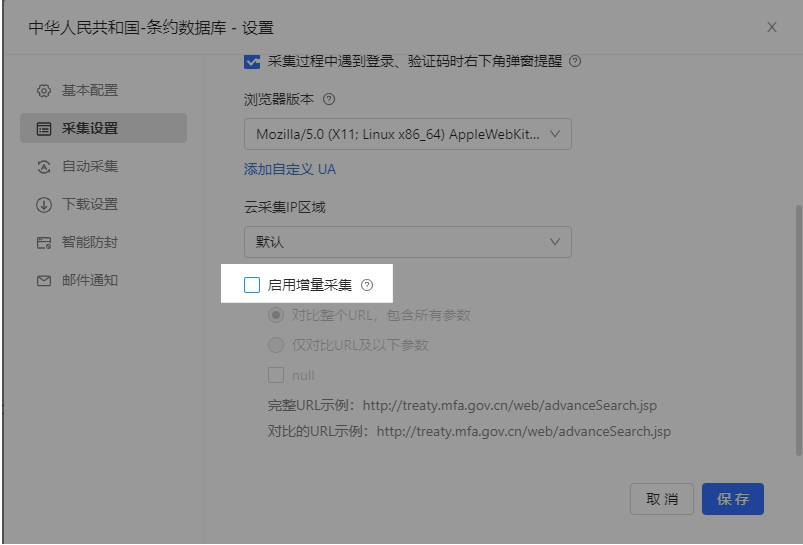
原因：云采集具有增量采集功能：根据url判断是否采集过，第一次采集后，后续不会再采集已采集过的url。如果是列表信息采集，如果后续有增加新增列表，但url没有发生改变，八爪鱼会跳过此条url不采集

解决方法：关闭增量采集。

<div style={{ textAlign: "center" }}>
  <img src="https://mintcdn.com/bazhuayu/Yt154rSVqBF4hhhV/assets/academy/troubleshooting/cloud-debug/65b08922ac7f5.png?fit=max&auto=format&n=Yt154rSVqBF4hhhV&q=85&s=f652815a11d131538aed96105639af7a" alt="cloud-debug" width="803" height="545" data-path="assets/academy/troubleshooting/cloud-debug/65b08922ac7f5.png" />
</div>

## 六、快速排错的小技巧

1、提取数据增加提取网页页码

帮助我们快速定位数据采集从哪一页开始出现问题

2、提取数据增加提取网页网址

提取不到字段时，帮助我们快速检查网页情况，是网页本身的问题（网址失效、本身无此字段），还是八爪鱼问题（无法正常打开网页、XPath定位不准等）

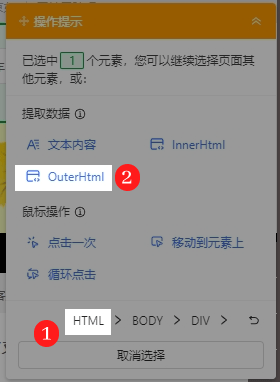
3、提取数据增加提取网页源码

常见于云采集，便于我们查看采集任务在云上的运行环境。

<div style={{ textAlign: "center" }}>
  <img src="https://mintcdn.com/bazhuayu/Yt154rSVqBF4hhhV/assets/academy/troubleshooting/cloud-debug/65b0892305914.png?fit=max&auto=format&n=Yt154rSVqBF4hhhV&q=85&s=8b91f80bb171247dc8c5fca6e00f4b13" alt="cloud-debug" width="280" height="382" data-path="assets/academy/troubleshooting/cloud-debug/65b0892305914.png" />
</div>

**总结：以上就是我们云采集通用排错教程，仔细阅读并理解其原理能够帮我们更好的采集互联网公开数据**

作者：Jeffrey

编辑：Jeffrey