> ## Documentation Index
> Fetch the complete documentation index at: https://www.bazhuayu.com/docs/llms.txt
> Use this file to discover all available pages before exploring further.

# 常见防采集套路及解决方法

**什么是防采集？**

用大白话来说，就是我们想利用工具采集某个网站的数据（前提当然是公开合法数据），但网站不想给你采集而设置的技术阻挡措施。

**网站常见的防采集套路有哪些？**

### 防采套路1：输入验证码框验证

<div style={{ textAlign: "center" }}>
  <img src="https://mintcdn.com/bazhuayu/Yt154rSVqBF4hhhV/assets/academy/troubleshooting/anti-scraping/654459dcdecd4.png?fit=max&auto=format&n=Yt154rSVqBF4hhhV&q=85&s=84d366e637c6a0f808087dfef31c5c2e" alt="anti-scraping" width="406" height="233" data-path="assets/academy/troubleshooting/anti-scraping/654459dcdecd4.png" />
</div>

**采集难度：★☆☆☆☆**

**常见网站：搜狗微信**

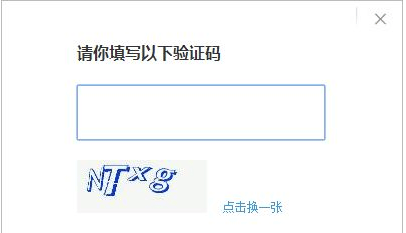
在采集某些网站过程中，爪子们是不是经常会遇到这样的情况，要求你输入验证码，否则就卡住进行不下去？

**对的，这是网站最常用且最基础的防采措施之一，它要求你必须你手动输入验证码里的数字和字母，才能继续看到更多信息或者进行下一步，以此来判断你是机器人还是真人。**

### 防采套路2：滑动拼图进行验证

<div style={{ textAlign: "center" }}>
  <img src="https://mintcdn.com/bazhuayu/Yt154rSVqBF4hhhV/assets/academy/troubleshooting/anti-scraping/654459dceff70.png?fit=max&auto=format&n=Yt154rSVqBF4hhhV&q=85&s=afc0d11d43758d840eec4cd9f9931970" alt="anti-scraping" width="348" height="209" data-path="assets/academy/troubleshooting/anti-scraping/654459dceff70.png" />
</div>

**采集难度：★★☆☆☆**

**常见网站：拉勾、B站**

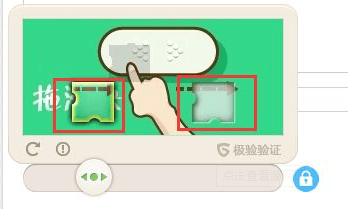
**验证码防采套路升级版，也是网站最常用来验证当前浏览用户是机器人还是人工的方式之一。**

它要求你必须滑动拼图到它指定的位置，才能通过验证进行下一步操作。

### 防采套路3：登录验证

<div style={{ textAlign: "center" }}>
  <img src="https://mintcdn.com/bazhuayu/Yt154rSVqBF4hhhV/assets/academy/troubleshooting/anti-scraping/654459dd20a8a.png?fit=max&auto=format&n=Yt154rSVqBF4hhhV&q=85&s=c40b6e87d546defc23de9dd24149a915" alt="anti-scraping" width="1255" height="401" data-path="assets/academy/troubleshooting/anti-scraping/654459dd20a8a.png" />
</div>

**采集难度：★★★☆☆**

**常见网站：新浪微博、新榜**

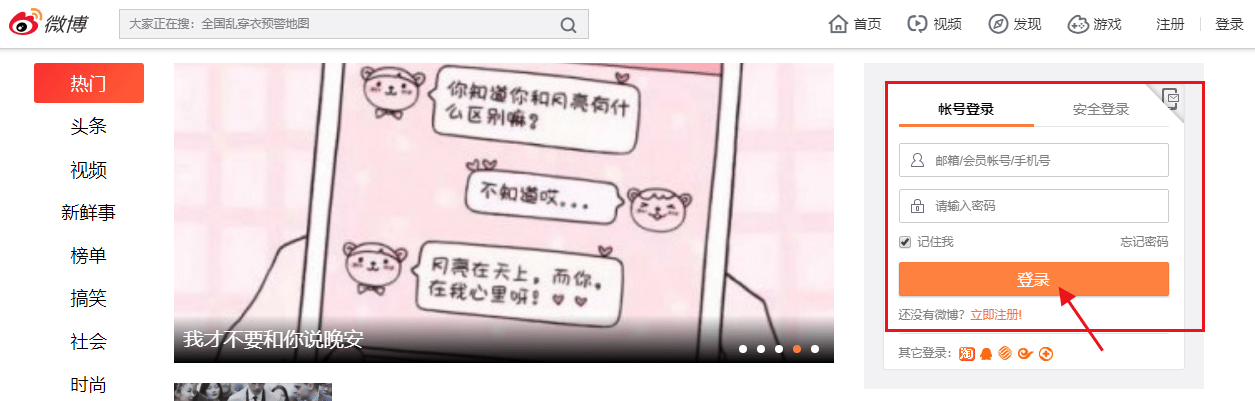
**这类网站通常需要登录才能看到更丰富的信息，否则只会展现非常有限的内容。** 放在八爪鱼采集器里，只要一启动，这类网站就立即弹出登录窗口，才能进行下一步，有时候还会出现在采集的过程当中。如果不懂的如何设置登录流程的爪子，很快会提醒"采集终止"。

### 防采套路4：数据加密

<div style={{ textAlign: "center" }}>
  <img src="https://mintcdn.com/bazhuayu/Yt154rSVqBF4hhhV/assets/academy/troubleshooting/anti-scraping/654459dceb236.png?fit=max&auto=format&n=Yt154rSVqBF4hhhV&q=85&s=9409fd980401373de0ce96388b616ac3" alt="anti-scraping" width="1044" height="408" data-path="assets/academy/troubleshooting/anti-scraping/654459dceb236.png" />
</div>

**采集难度：★★★★☆**

**常见网站：大众点评**

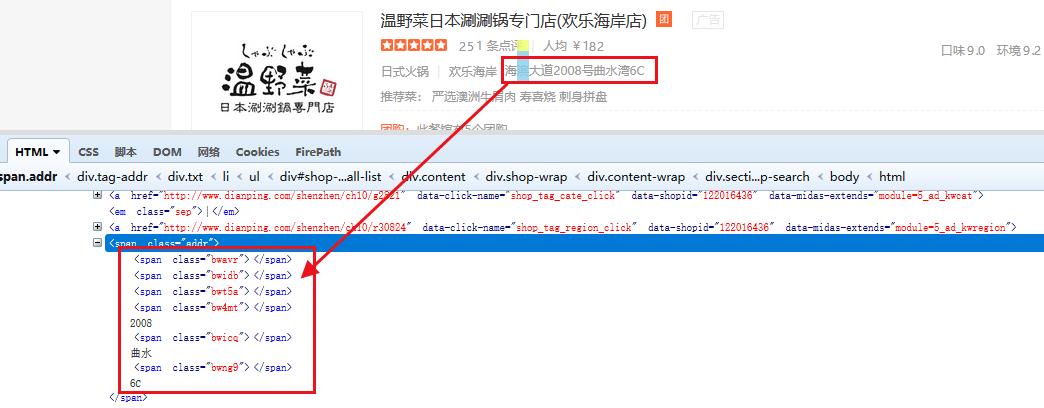
**有些网站通过对数据加密进行防采集。** 如大众点评（上图），我们在网页上看到的内容是这家餐厅的"地址"，但我们打开源代码看，这段文字被已经被加密分离，这会导致什么结果？

这将导致即便你将它采集下来，文字也是乱码或支离破碎的，无法整合成一段完整的文字。

### 防采套路5：反馈虚假数据

<div style={{ textAlign: "center" }}>
  <img src="https://mintcdn.com/bazhuayu/Yt154rSVqBF4hhhV/assets/academy/troubleshooting/anti-scraping/654459dd36013.png?fit=max&auto=format&n=Yt154rSVqBF4hhhV&q=85&s=3ff3b9a686c049112a24b562a5942631" alt="anti-scraping" width="1187" height="596" data-path="assets/academy/troubleshooting/anti-scraping/654459dd36013.png" />
</div>

**采集难度：★★★★★**

**常见网站：携程网**

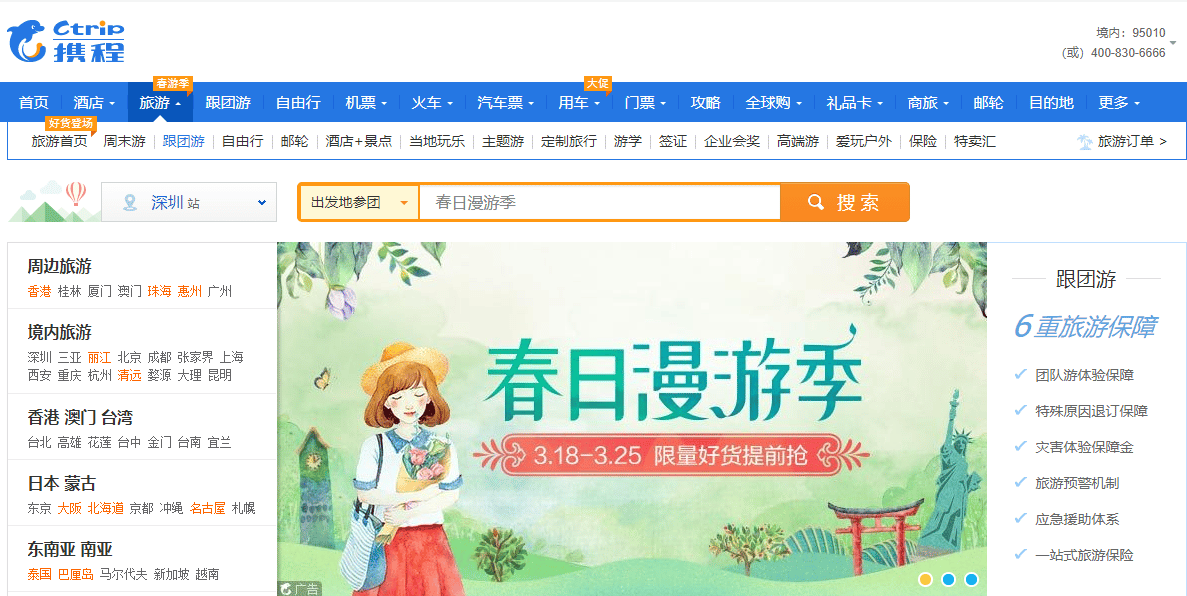
最近看到一个携程开发写的帖子，关于他们是如何给爬虫反馈"假数据"的。看完觉得携程太"可怕了"！

**当你发现辛辛苦苦采集下来的数据居然是假的，请问你心累不心累？！所谓道高一尺，魔高一丈，遇到这种给你"投毒"的网站就请绕道吧，除非你想到更好的破解方法！**

### 防采套路6：禁止访问

<div style={{ textAlign: "center" }}>
  <img src="https://mintcdn.com/bazhuayu/Yt154rSVqBF4hhhV/assets/academy/troubleshooting/anti-scraping/654459dccff31.png?fit=max&auto=format&n=Yt154rSVqBF4hhhV&q=85&s=1bf760bf47823bc19858b03ff871cd63" alt="anti-scraping" width="461" height="211" data-path="assets/academy/troubleshooting/anti-scraping/654459dccff31.png" />
</div>

**采集难度：★★★★★**

**常见网站：个别网站**

小八目前还没怎么遇到过这种情况。当然，我们没事也不会故意"以身试法"，去试探网站的防采底线。

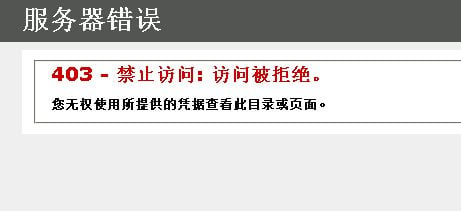
**这种情况，主要还是看网站的防采机制设计，如果触发了，通常的结果就是全面封锁和禁止。比如封你的账号、封你的IP地址。** 一旦被封锁，网站会自动给你错误页面或无法让你正常浏览。

### 几种最容易触发防采集的情况。

<div style={{ textAlign: "center" }}>
  <img src="https://mintcdn.com/bazhuayu/Yt154rSVqBF4hhhV/assets/academy/troubleshooting/anti-scraping/654459dda6d15.png?fit=max&auto=format&n=Yt154rSVqBF4hhhV&q=85&s=2ba0cc02e722e3f5c062e5d30e4c0591" alt="anti-scraping" width="1200" height="500" data-path="assets/academy/troubleshooting/anti-scraping/654459dda6d15.png" />
</div>

**1、采集速度过快、频次过高**

嗯？这个用户怎么会1分钟浏览几十个页面呢？而且还是一天24小时不休息？有问题，我要去查查！啊，绝对是机器，封掉\~！

**采集速度过快、频次过快很容易引起对方网站注意，对方人员很容易就识别出你是机器在爬取它的内容，不是人类。** 毕竟正常人是无法像机器人那样不休不眠地高速运转。

**2、采集数据量过大**

当你速度和频次上来了，你采集的数据量将会很庞大，小八曾遇到爪子一天采集几百万条数据的情况，如果对方官网防采严格，则容易触发防采集机制。

**3、一直使用同一个IP或账户**

一旦对方网站发现你的IP/账户为机器爬虫，那么很有可能你的IP/账户就会被列入他们的黑名单，以后不允许你访问或者给你展示一个错误页面，让你无从下手。

### 针对防采集八爪鱼推出了一系列智能防封解决方法

**解决方法1：自动识别输入验证码**

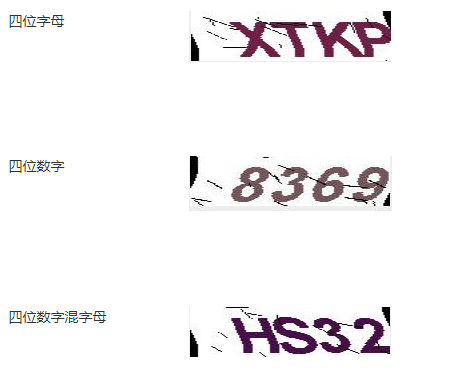
八爪鱼提供验证码识别控件，目前支持自动识别以下几种类型的验证码！

<div style={{ textAlign: "center" }}>
  <img src="https://mintcdn.com/bazhuayu/Yt154rSVqBF4hhhV/assets/academy/troubleshooting/anti-scraping/654459de047f8.png?fit=max&auto=format&n=Yt154rSVqBF4hhhV&q=85&s=6f128d328cdc060d88289ef82b515efd" alt="anti-scraping" width="469" height="388" data-path="assets/academy/troubleshooting/anti-scraping/654459de047f8.png" />
</div>

**解决方法2：设置自动登录**

八爪鱼提供以下登录模式，

**图文教程：**<a href="/docs/zh/academy/basic-collection/beginner/login-verification" target="_blank" rel="noopener noreferrer">登录后再采集数据（含登录时有验证码）</a>

**视频教程：**<a href="http://www.bazhuayu.com:8099/tutorial8/81spdlyz" target="_blank" rel="noopener noreferrer">登录后再采集数据（含登录时有验证码）</a>

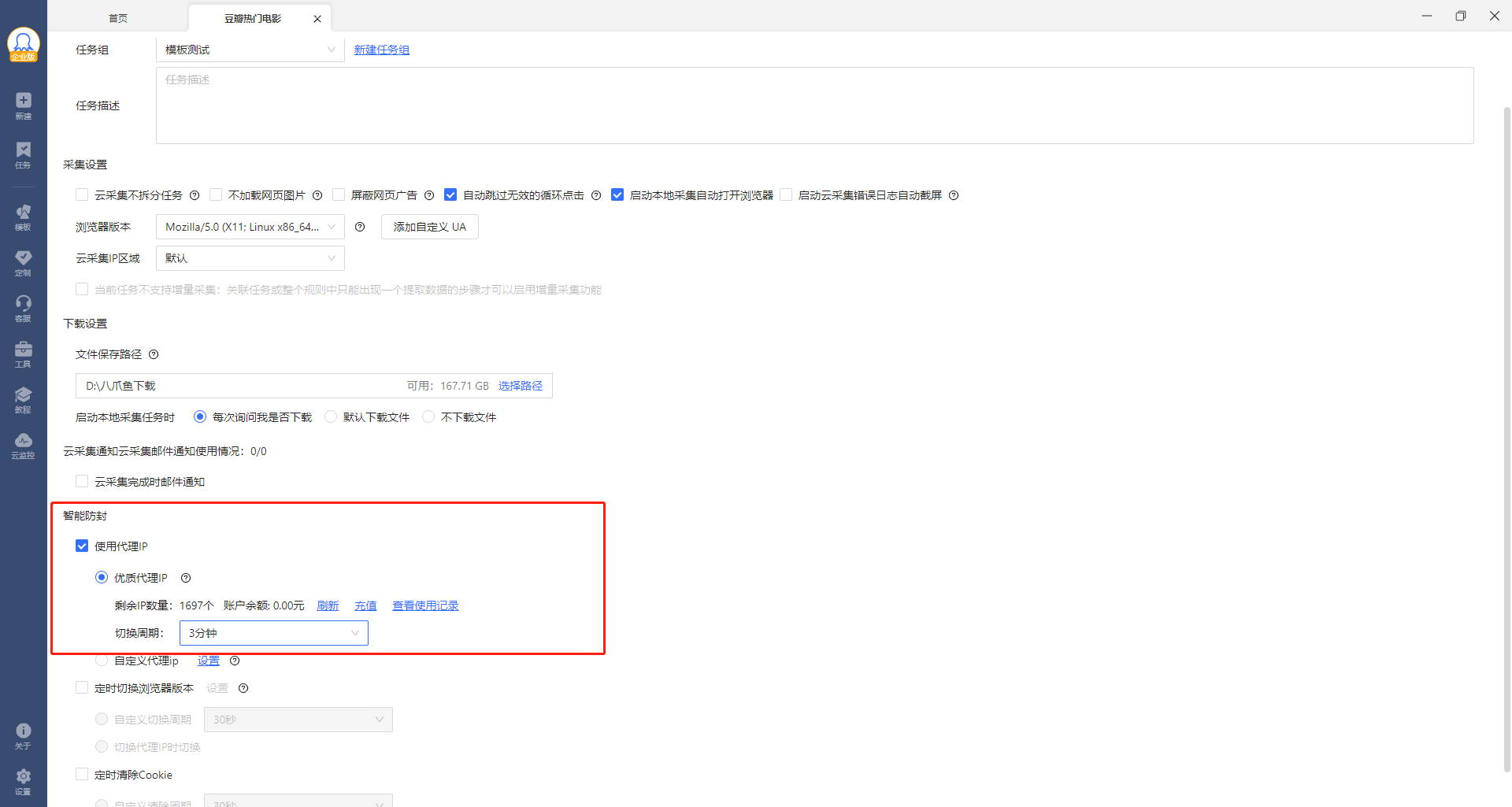
**解决方案3：优质代理IP**

八爪鱼提供了优质的代理IP池，在采集过程中支持智能定时切换IP，避免同个IP采集被网站追踪封锁。

<div style={{ textAlign: "center" }}>
  <img src="https://mintcdn.com/bazhuayu/Yt154rSVqBF4hhhV/assets/academy/troubleshooting/anti-scraping/654459dde21f2.png?fit=max&auto=format&n=Yt154rSVqBF4hhhV&q=85&s=e1929e6fea46e97a950b1e5b7a04c9dc" alt="anti-scraping" width="1920" height="1025" data-path="assets/academy/troubleshooting/anti-scraping/654459dde21f2.png" />
</div>

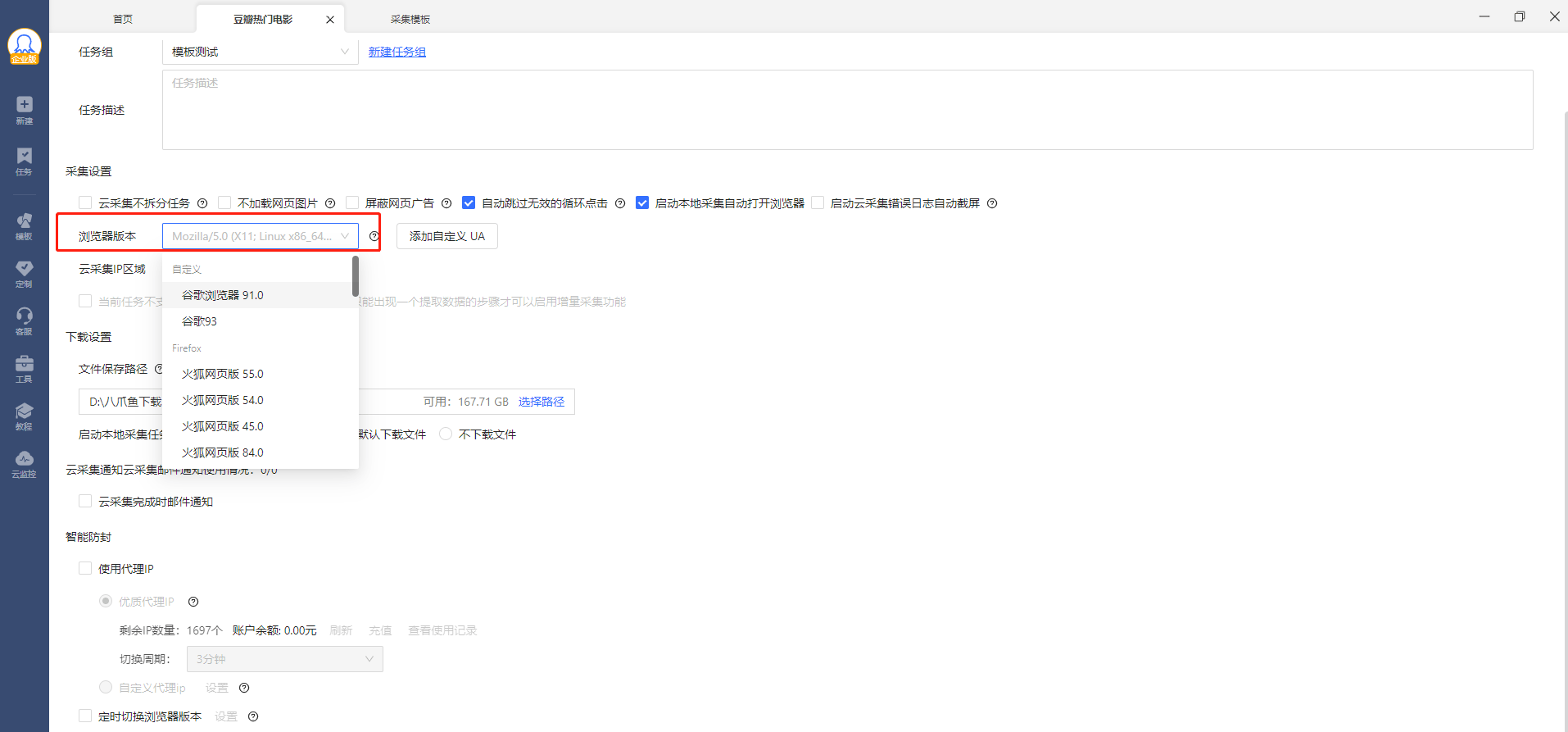
**解决方案4：切换UA(浏览器）**

如果是防采封UA，可以设置切换浏览器

<div style={{ textAlign: "center" }}>
  <img src="https://mintcdn.com/bazhuayu/Yt154rSVqBF4hhhV/assets/academy/troubleshooting/anti-scraping/654459de09e6f.png?fit=max&auto=format&n=Yt154rSVqBF4hhhV&q=85&s=0f02f806f6273d22e0cd9c5ca8a97291" alt="anti-scraping" width="1914" height="893" data-path="assets/academy/troubleshooting/anti-scraping/654459de09e6f.png" />
</div>

**解决方案5：放慢采集速度**

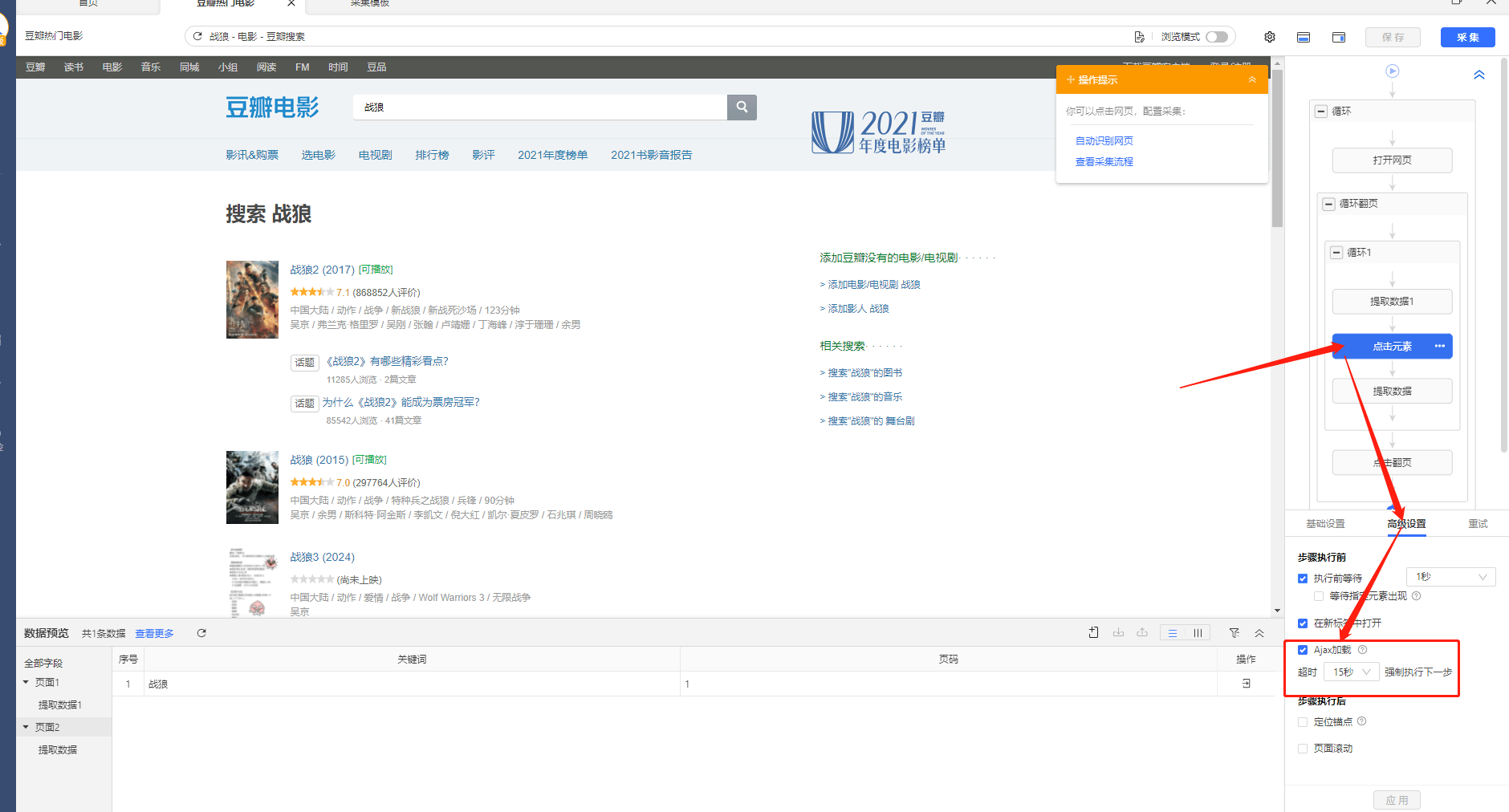
**1）Ajax加载**

<div style={{ textAlign: "center" }}>
  <img src="https://mintcdn.com/bazhuayu/Yt154rSVqBF4hhhV/assets/academy/troubleshooting/anti-scraping/654459de85697.png?fit=max&auto=format&n=Yt154rSVqBF4hhhV&q=85&s=eeee2ed8822e869cbfa4bccb1e8072b7" alt="anti-scraping" width="1880" height="1012" data-path="assets/academy/troubleshooting/anti-scraping/654459de85697.png" />
</div>

**AJAX：** 延时加载、异步更新的一种脚本技术。简单来说就是，我们可以通过Ajax技术让网页加载的时间更长一些（可以设置0-30秒），让浏览速度变慢一点点避免查封

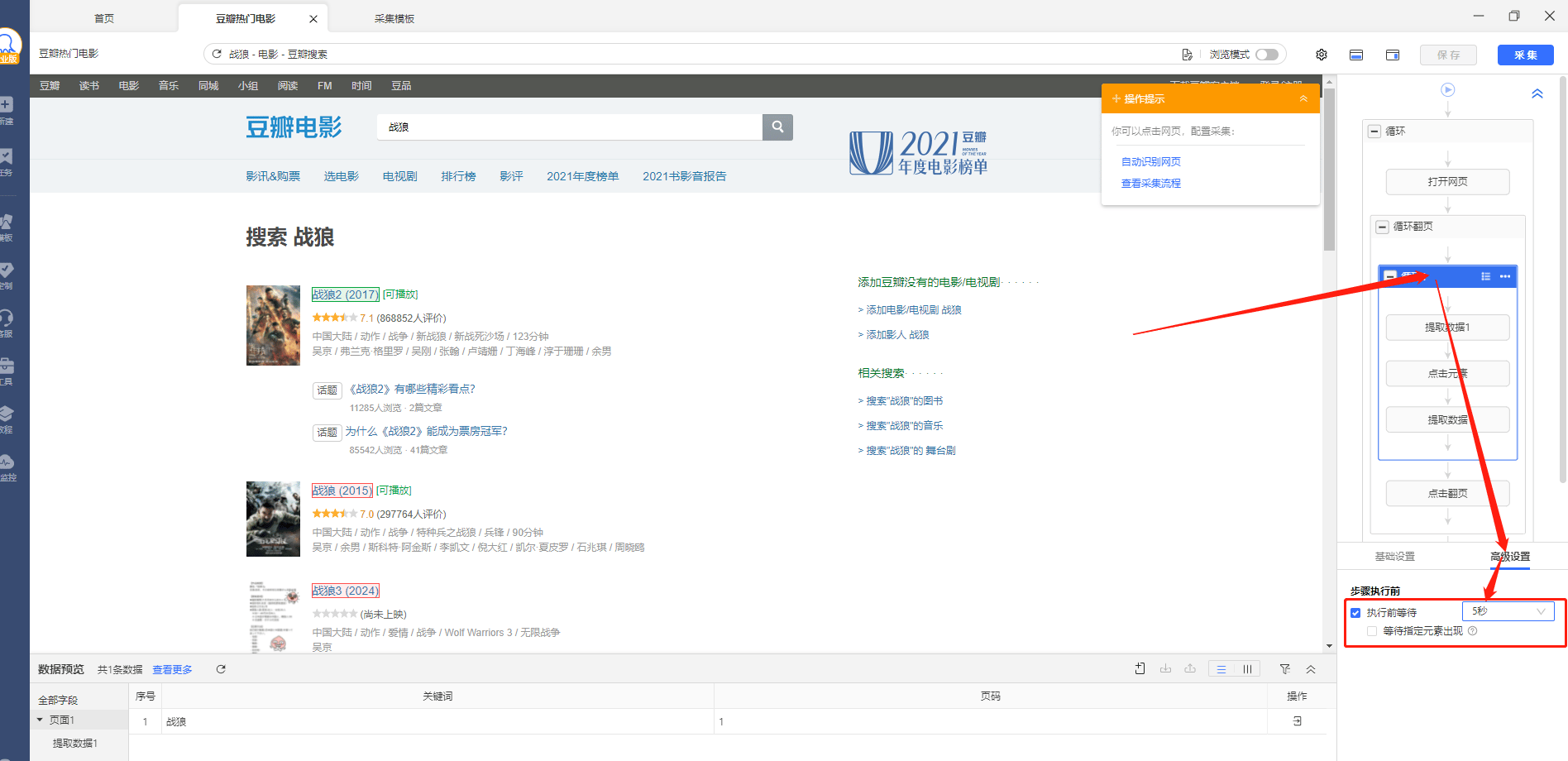
**2）执行前等待**

<div style={{ textAlign: "center" }}>
  <img src="https://mintcdn.com/bazhuayu/Yt154rSVqBF4hhhV/assets/academy/troubleshooting/anti-scraping/654459de81ab7.png?fit=max&auto=format&n=Yt154rSVqBF4hhhV&q=85&s=1157409e30e1479397dd28dd4f450e58" alt="anti-scraping" width="1896" height="920" data-path="assets/academy/troubleshooting/anti-scraping/654459de81ab7.png" />
</div>

执行前等待是指在进行采集操作之前，八爪鱼会自动默认等待一段时间，确保要采集的数据已经加载出来。这个方法同样适用于防采比较严格的网站，通过放慢采集速度来躲避反爬虫的追踪。