> ## Documentation Index
> Fetch the complete documentation index at: https://www.bazhuayu.com/docs/llms.txt
> Use this file to discover all available pages before exploring further.

# 【腾讯新闻】视频采集与导出

为了让更多的用户实现采集需求，满足对网页图片、文档等文件下载等场景的期待，在八爪鱼最新版本上线了【文件下载】功能。大家不仅可以使用八爪鱼采集所需数据，还可以在采集的过程中下载网页上的文件，包括**图片、音频、视频、文档**等多种格式。

采集过程中，当用户需要采集网页中的图片、文档等各类文件时，八爪鱼可智能识别文件类型并提供下载选项，帮助用户一次性获取所需数据及文件。

【文件下载】功能支持图片、音频、视频、文档等多种格式的文件下载，例如：

  <img src="https://mintcdn.com/bazhuayu/5uWdYh8V79TyjNlh/assets/academy/case-studies/tencent-news-video-export/01-656e78f5f3e73.png?fit=max&auto=format&n=5uWdYh8V79TyjNlh&q=85&s=9b32e05daf7614685903b76d1d268052" alt="" width="484" height="161" data-path="assets/academy/case-studies/tencent-news-video-export/01-656e78f5f3e73.png" />

但需要注意目前八爪鱼【文件下载】功能仅支持本地采集模式，云采集文件下载功能正在研发中，请大家耐心等待。


**常见的应用场景**

视频下载功能只有个人版及以上版本支持

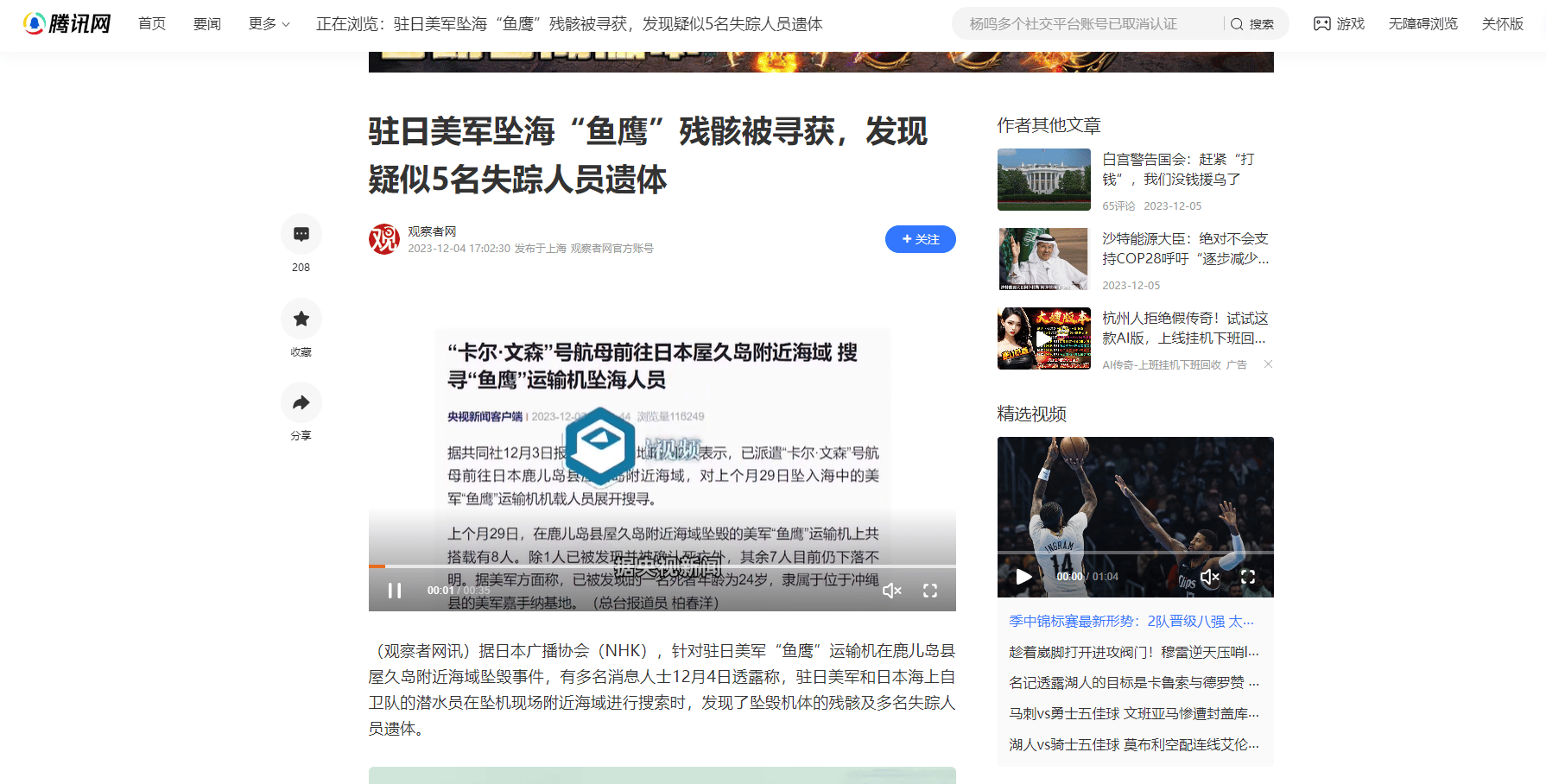
网页包含视频
<img src="https://mintcdn.com/bazhuayu/5uWdYh8V79TyjNlh/assets/academy/case-studies/tencent-news-video-export/02-656e81a3170b9.png?fit=max&auto=format&n=5uWdYh8V79TyjNlh&q=85&s=39a2fb46a6cdaa86330197aa4b2db69f" alt="【腾讯新闻】视频采集与导出" width="1790" height="908" data-path="assets/academy/case-studies/tencent-news-video-export/02-656e81a3170b9.png" />

采集示例：[*https://new.qq.com/rain/a/20231204A06CDK00*](https://new.qq.com/rain/a/20231204A06CDK00)


**采集视频链接并下载**

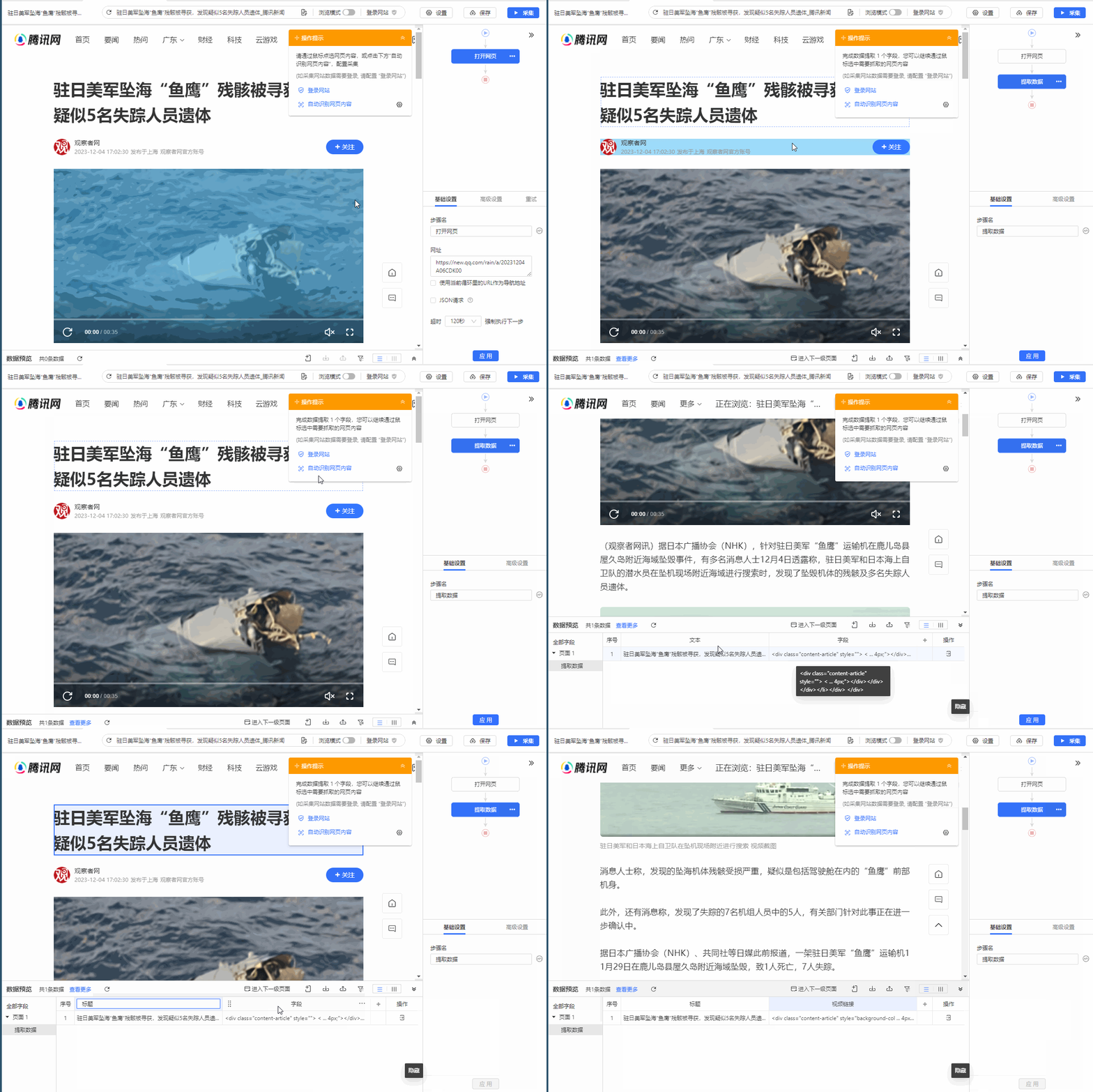
**1.采集页面的标题、网页源码**

采集字段文字标题和网页源码outerhtml，因为视频链接没办法直接采集获取到，所以采集源码是为了格式化获取到视频链接。

<img src="https://mintcdn.com/bazhuayu/5uWdYh8V79TyjNlh/assets/academy/case-studies/tencent-news-video-export/03-656e853d3a7ef.gif?s=19ba103a44b7a78129b5bc6f1249f8a9" alt="" width="1200" height="800" data-path="assets/academy/case-studies/tencent-news-video-export/03-656e853d3a7ef.gif" />


**2.格式化源码获取视频链接**

对源码进行格式化处理获取视频链接

<video controls src="https://resource-wangsu.helplook.net/docker_production/3mkuae/article/hlMluc/video/656e864c72b3b.mp4" width="100%" />


> 特别说明：
>
> 格式化原理详情请学习教程：[正则表达式](/docs/zh/academy/advanced-features/data-processing/regular-expression)


**3.设置视频下载**

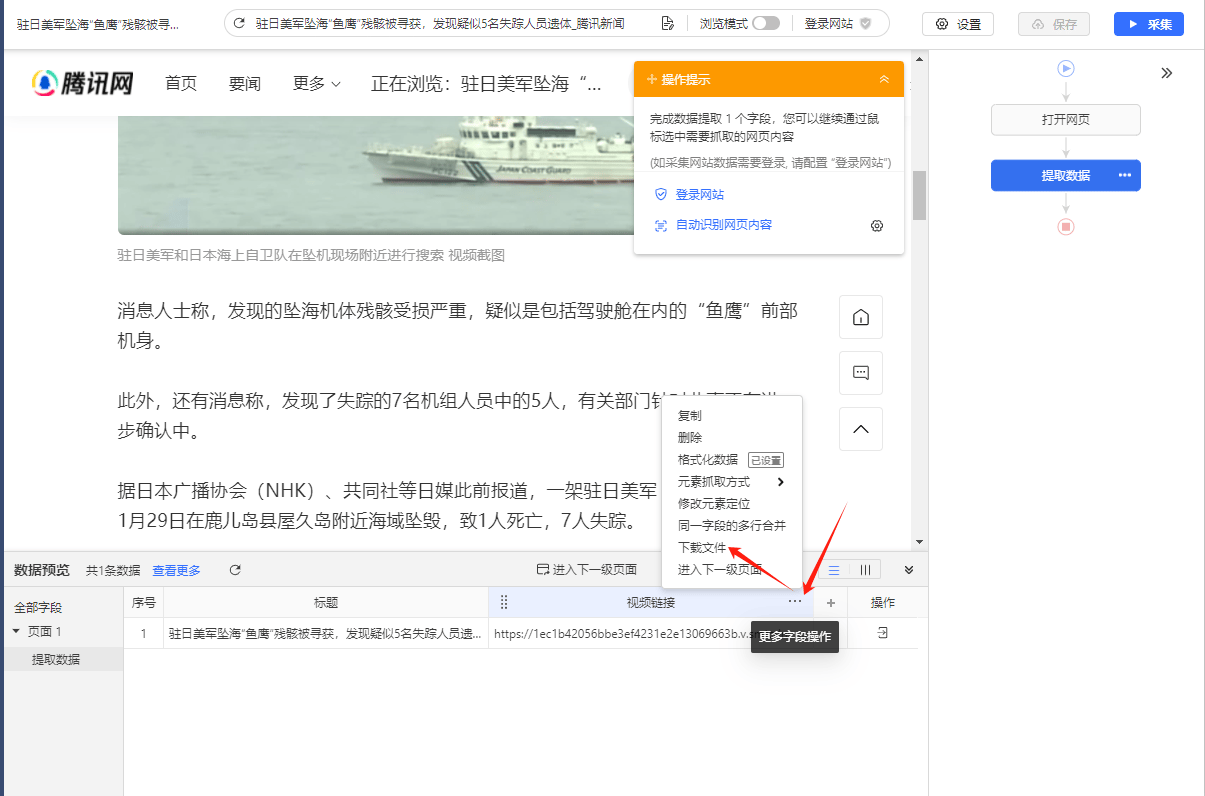
点击视频链接字段右上角【...】，然后选择【下载文件】。

<img src="https://mintcdn.com/bazhuayu/5uWdYh8V79TyjNlh/assets/academy/case-studies/tencent-news-video-export/04-656e87f4cf6e4.png?fit=max&auto=format&n=5uWdYh8V79TyjNlh&q=85&s=db6d92d72007513e84b7959adb2e5e82" alt="【腾讯新闻】视频采集与导出" width="1205" height="796" data-path="assets/academy/case-studies/tencent-news-video-export/04-656e87f4cf6e4.png" />

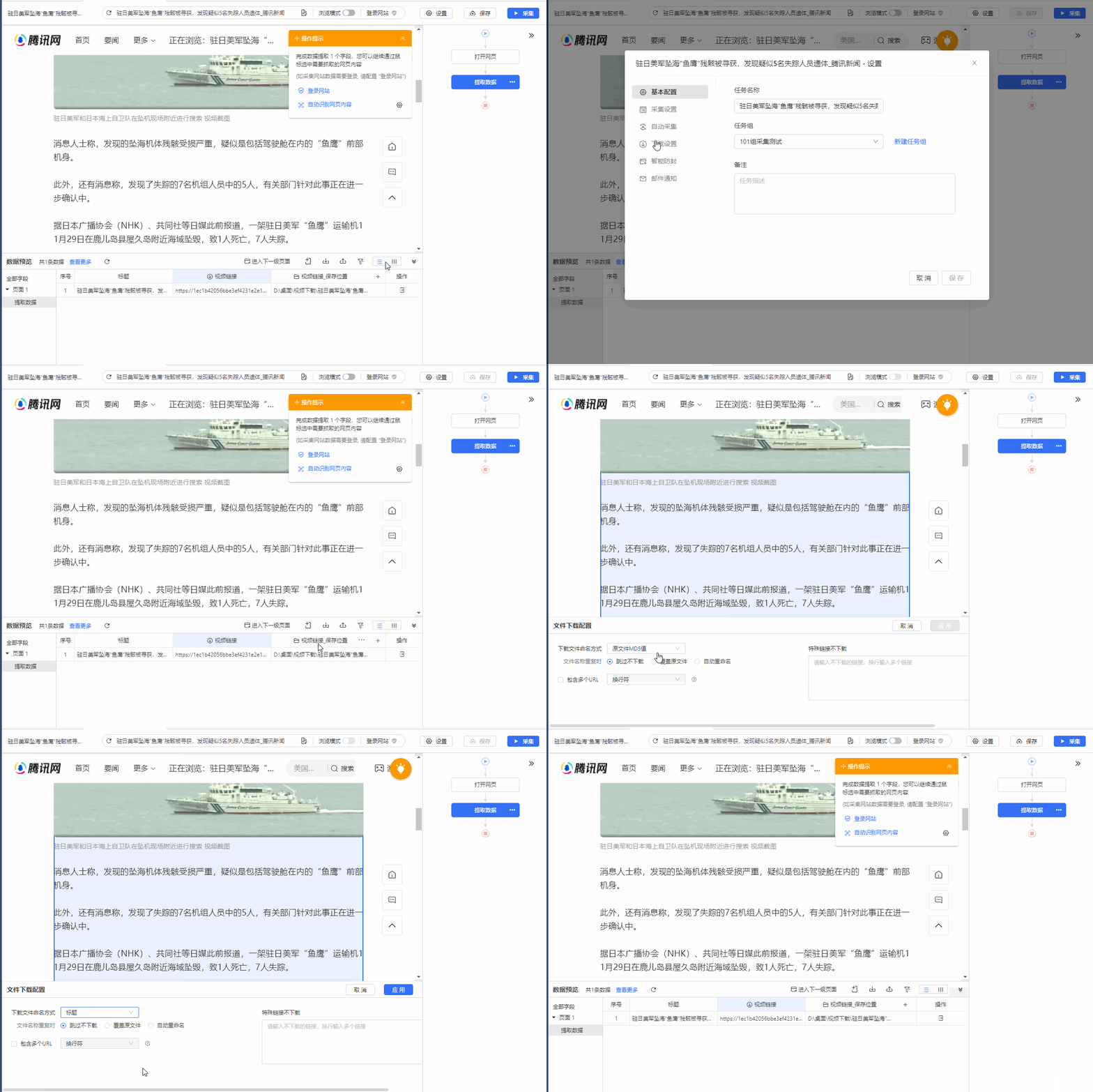
设置下载路径，文件命名方式。

<img src="https://mintcdn.com/bazhuayu/5uWdYh8V79TyjNlh/assets/academy/case-studies/tencent-news-video-export/05-656e884e5c86d.gif?s=a9149dd0a68d5321cd7ea922688fcd0b" alt="" width="1200" height="800" data-path="assets/academy/case-studies/tencent-news-video-export/05-656e884e5c86d.gif" />


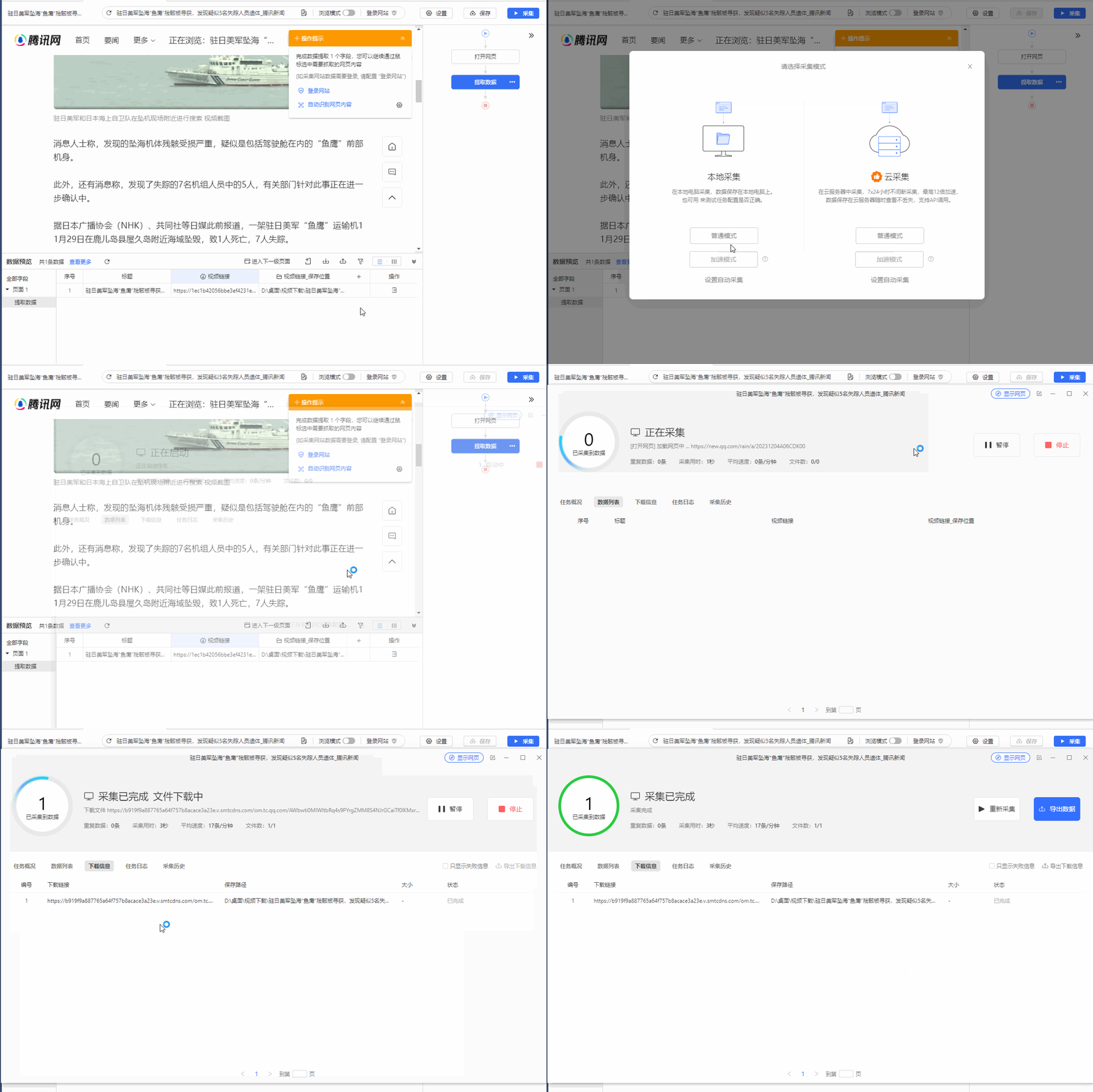
启动采集并下载文件。

<img src="https://mintcdn.com/bazhuayu/5uWdYh8V79TyjNlh/assets/academy/case-studies/tencent-news-video-export/06-656e888975495.gif?s=db4fec417994758db3ccf7083d8d17b6" alt="" width="1200" height="800" data-path="assets/academy/case-studies/tencent-news-video-export/06-656e888975495.gif" />

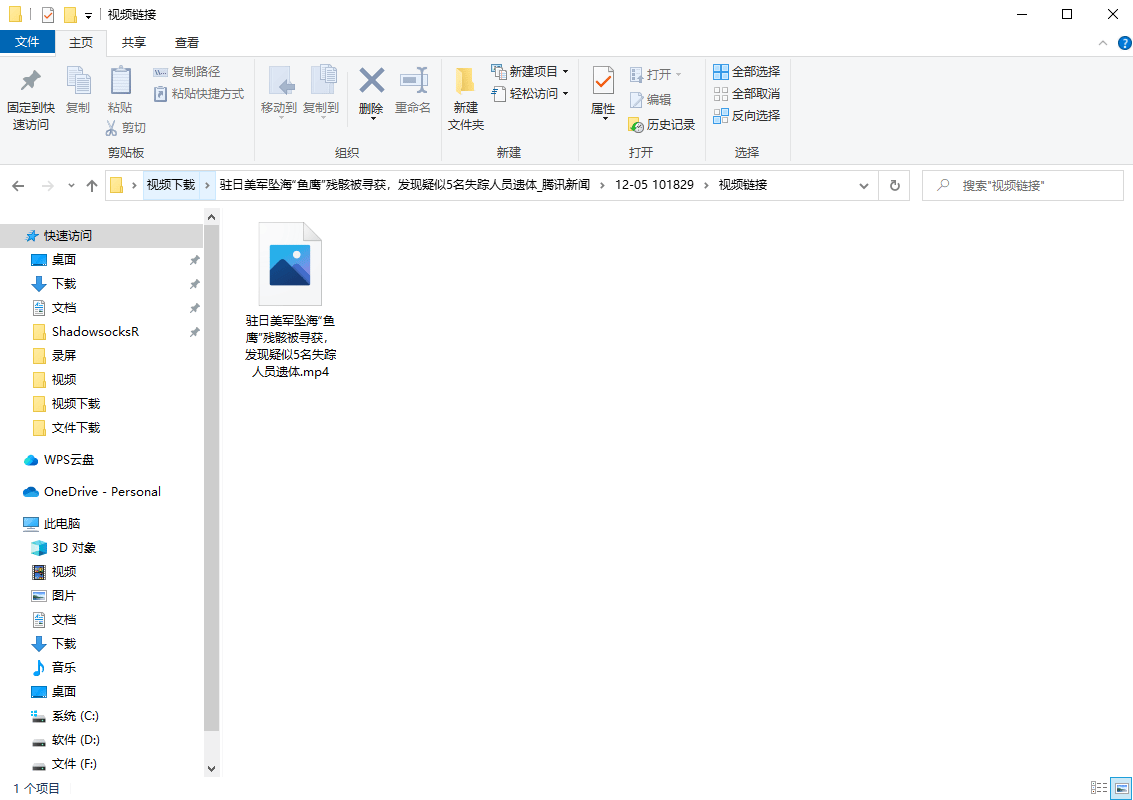
最后查看下载文件保存的路径，可以看到视频已经下载下来了。

<img src="https://mintcdn.com/bazhuayu/5uWdYh8V79TyjNlh/assets/academy/case-studies/tencent-news-video-export/07-656e893f8a28f.png?fit=max&auto=format&n=5uWdYh8V79TyjNlh&q=85&s=8b7e2ef23fcd4a5aaf717544bfd90e0a" alt="【腾讯新闻】视频采集与导出" width="1133" height="800" data-path="assets/academy/case-studies/tencent-news-video-export/07-656e893f8a28f.png" />