> ## Documentation Index
> Fetch the complete documentation index at: https://www.bazhuayu.com/docs/llms.txt
> Use this file to discover all available pages before exploring further.
# 无【下一页】按钮,点击数字进行翻页
> 无【下一页】按钮,点击数字进行翻页教程,来自八爪鱼帮助中心「操作指南 / 基本采集」。
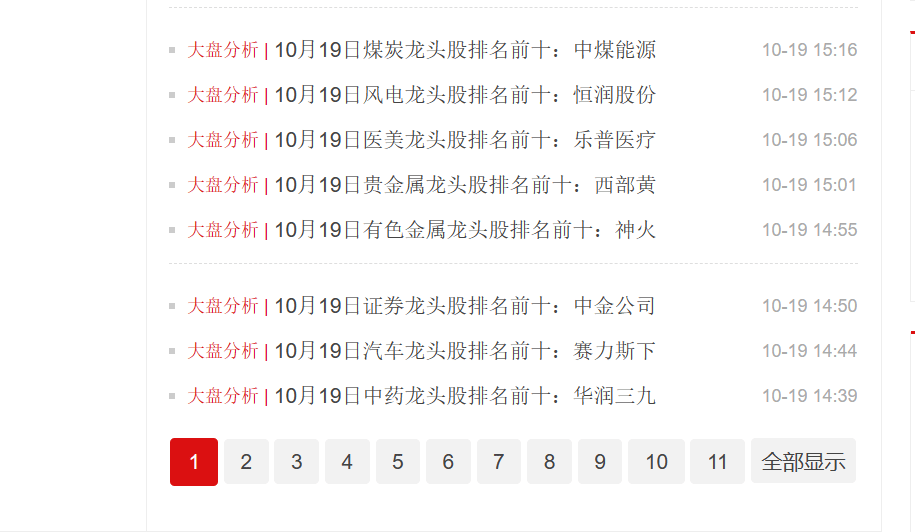
有的网页无下一页按钮,通过点击数字进行翻页,示例网址如:[http://stock.cngold.org/news/](http://stock.cngold.org/news/)
使用智能识别和自行配置的采集规则,都能实现点击数字进行翻页,具体设置方法如下:
 ## 一、使用智能识别实现【数字翻页】
八爪鱼的智能识别,支持【数字翻页】的智能识别,如下视频所示:
[](https://resource-wangsu.helplook.net/docker_production/3mkuae/article/lbkGWs/video/65339ba16bae9)
## 二、自己配置采集流程实现【数字翻页】
如果想了解背后的原理,我们可以来尝试自己配置这类网页的采集流程。
让八爪鱼不断点击数字进行翻页:当前页是第1页,点第2页;当前页是第2页,点第3页.......当前页是最后1页,结束【循环翻页】。
所以问题的关键是:需要写一条XPath,使其始终能定位到当前页的下一页(最后1页除外)。需要大家有一定的XPath知识,点击学习 XPath入门 。以下为具体步骤。
Step1. **写一条XPath,使其始终能定位到当前页的下一页(最后1页除外)。分2步:先定位到当前页;再定位到当前页的下一页。**
**先定位到当前页。**
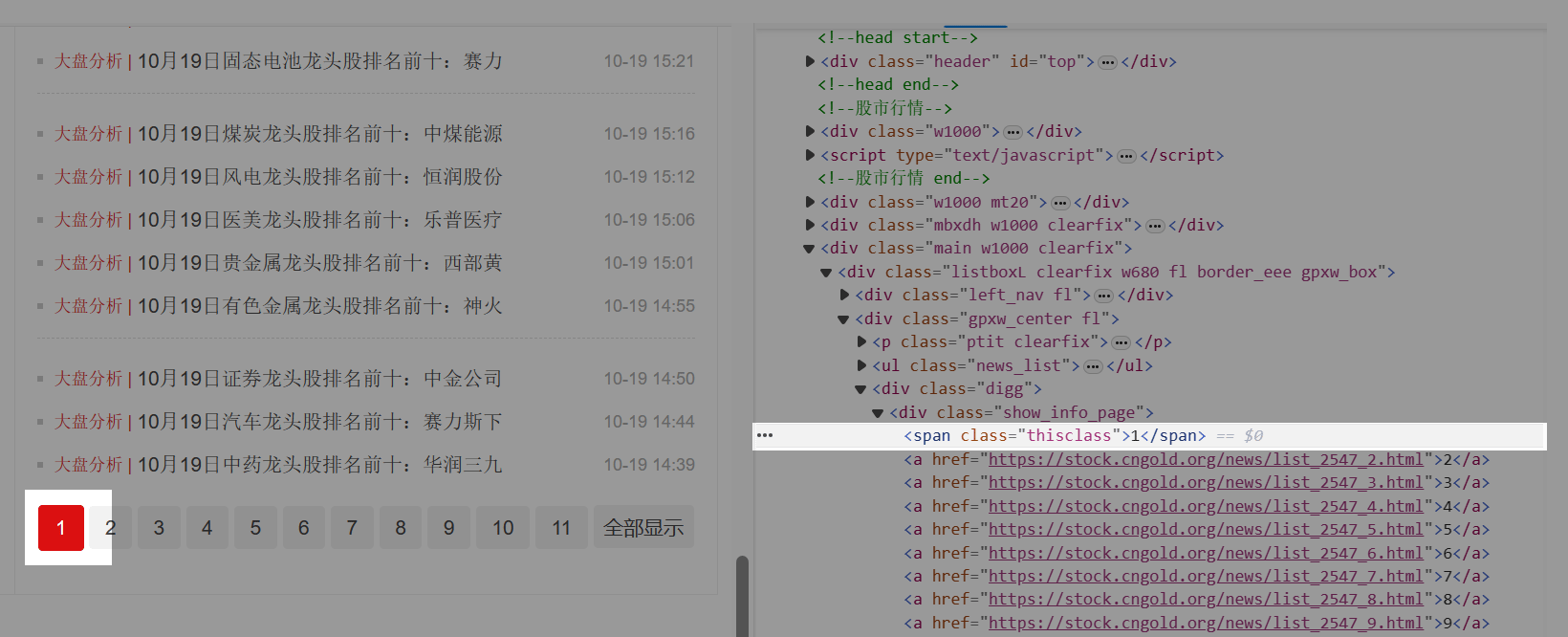
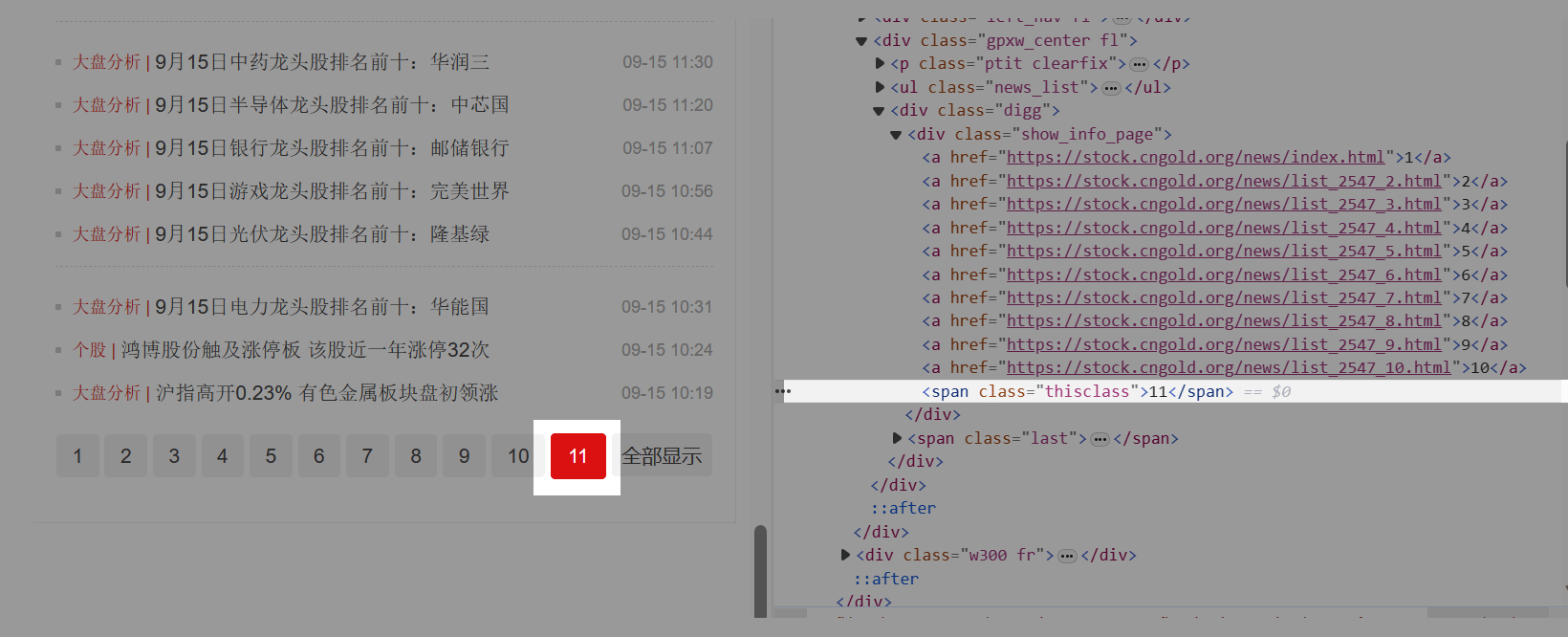
当前页分别是第1页、第2页、第3页......最后1页时,观察网页源码的特征。我们发现:当前页的源码是span标签,而其他页则是a标签。
## 一、使用智能识别实现【数字翻页】
八爪鱼的智能识别,支持【数字翻页】的智能识别,如下视频所示:
[](https://resource-wangsu.helplook.net/docker_production/3mkuae/article/lbkGWs/video/65339ba16bae9)
## 二、自己配置采集流程实现【数字翻页】
如果想了解背后的原理,我们可以来尝试自己配置这类网页的采集流程。
让八爪鱼不断点击数字进行翻页:当前页是第1页,点第2页;当前页是第2页,点第3页.......当前页是最后1页,结束【循环翻页】。
所以问题的关键是:需要写一条XPath,使其始终能定位到当前页的下一页(最后1页除外)。需要大家有一定的XPath知识,点击学习 XPath入门 。以下为具体步骤。
Step1. **写一条XPath,使其始终能定位到当前页的下一页(最后1页除外)。分2步:先定位到当前页;再定位到当前页的下一页。**
**先定位到当前页。**
当前页分别是第1页、第2页、第3页......最后1页时,观察网页源码的特征。我们发现:当前页的源码是span标签,而其他页则是a标签。
 > 特别说明:
>
> a. 这个网页,当前页和其他页的源码区别非常明显。但有的网页可能没这么明显,请大家耐心去找到当前页和其他页的源码区别。
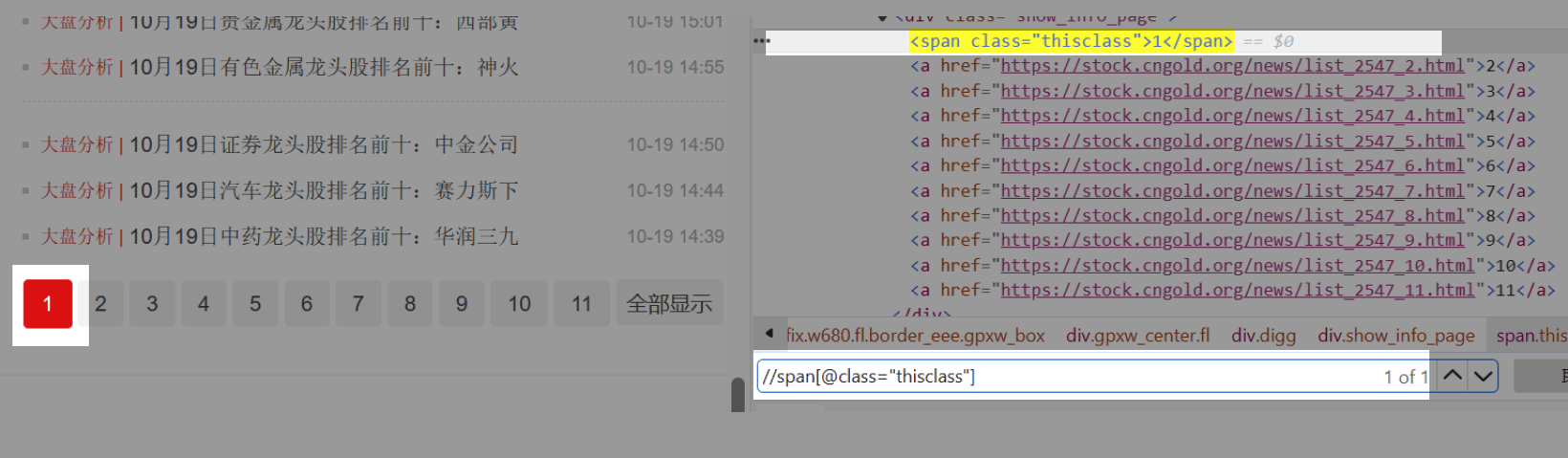
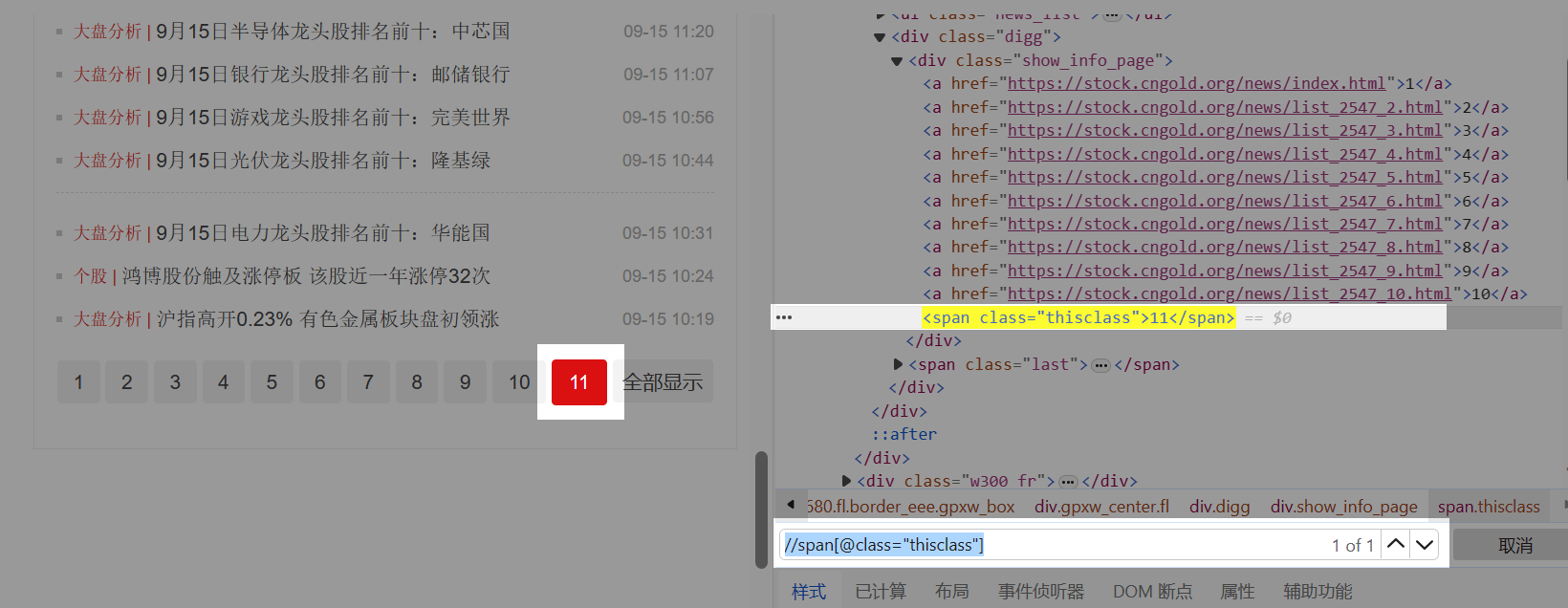
继续观察当前页源码中span标签的特征,找到具有唯一性的那个特征。我们发现,当前页对应的span标签,具有class属性,且class属性的属性值为thisclass。根据这个特征,写出一条定位XPath://span\[@class="thisclass"] 。
检查后发现,能定位到每个当前页。
> 特别说明:
>
> a. 这个网页,当前页和其他页的源码区别非常明显。但有的网页可能没这么明显,请大家耐心去找到当前页和其他页的源码区别。
继续观察当前页源码中span标签的特征,找到具有唯一性的那个特征。我们发现,当前页对应的span标签,具有class属性,且class属性的属性值为thisclass。根据这个特征,写出一条定位XPath://span\[@class="thisclass"] 。
检查后发现,能定位到每个当前页。
 **再定位到当前页的下一页 。**
在XPath中,【following-sibling:: 】函数可实现。【following-sibling:: 】的意思是,定位到当前标签后面的所有同级标签。
> a. 什么是同级标签?HTML文档是树状结构,标签之间具有层级性。同级标签即处于同一层级的标签。
**再定位到当前页的下一页 。**
在XPath中,【following-sibling:: 】函数可实现。【following-sibling:: 】的意思是,定位到当前标签后面的所有同级标签。
> a. 什么是同级标签?HTML文档是树状结构,标签之间具有层级性。同级标签即处于同一层级的标签。
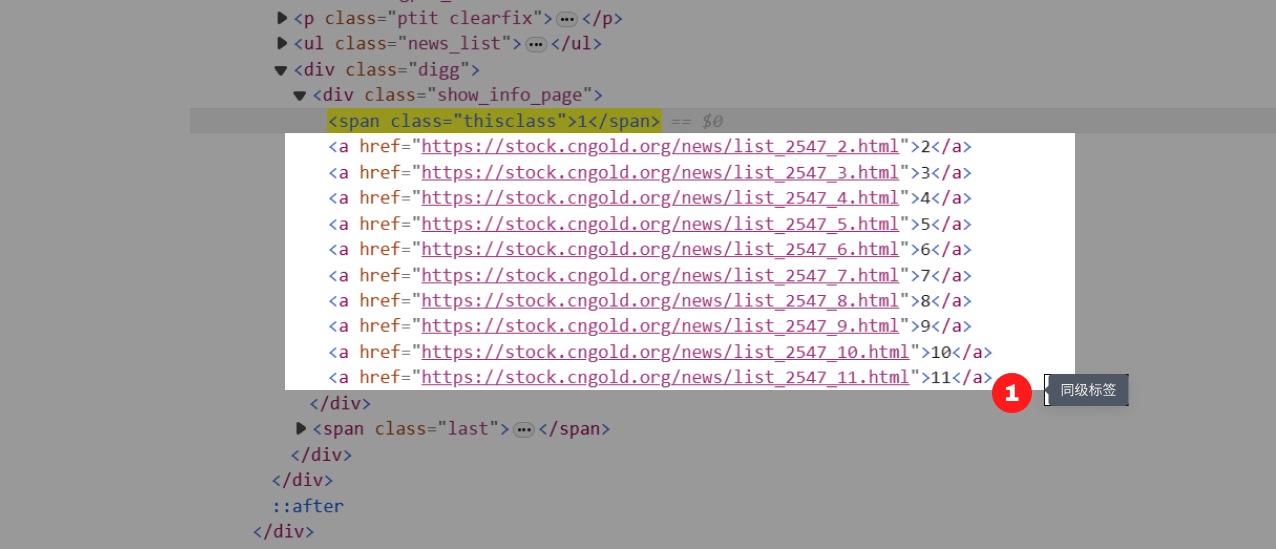 //span\[@class="thisclass"]定位到了class属性值为thisclass的span标签,这个span标签后面的同级标签是a标签。则 //span\[@class="thisclass"]/following-sibling::a ,就定位到了此span标签后面的所有同级a标签。
由于我们是 **需要定位到当前页的下一页**,所以只需要定位到第一个a标签,在a后面加上\[1]即可。最终的定位XPath为://span\[@class='thisclass']/following-sibling::a\[1]
检查后发现,能定位到每个当前页的下一页(除最后1页,最后1页无需翻页,正是我们需要的)\
//span\[@class="thisclass"]定位到了class属性值为thisclass的span标签,这个span标签后面的同级标签是a标签。则 //span\[@class="thisclass"]/following-sibling::a ,就定位到了此span标签后面的所有同级a标签。
由于我们是 **需要定位到当前页的下一页**,所以只需要定位到第一个a标签,在a后面加上\[1]即可。最终的定位XPath为://span\[@class='thisclass']/following-sibling::a\[1]
检查后发现,能定位到每个当前页的下一页(除最后1页,最后1页无需翻页,正是我们需要的)\
 Step2. 在八爪鱼中创建一个【循环翻页】。往流程中拖入一个【循环】步骤,选择循环方式为【单个元素】,将上面写好的XPath://span\[@class='thisclass']/following-sibling::a\[1],复制到【单个元素】后面的文本框中,点击【确定】保存。
再往【循环】里面拖入一个【点击元素】的步骤,设置Ajax超时时间为7秒,然后点击【确定】保存。手动执行一个规则,发现可正常翻页。
为什么要设置Ajax?点击查看 Ajax教程 。
[](https://resource-wangsu.helplook.net/docker_production/3mkuae/article/lbkGWs/video/6533a7339937a)
接下来就是按需提取数据了,不再赘述。
Step2. 在八爪鱼中创建一个【循环翻页】。往流程中拖入一个【循环】步骤,选择循环方式为【单个元素】,将上面写好的XPath://span\[@class='thisclass']/following-sibling::a\[1],复制到【单个元素】后面的文本框中,点击【确定】保存。
再往【循环】里面拖入一个【点击元素】的步骤,设置Ajax超时时间为7秒,然后点击【确定】保存。手动执行一个规则,发现可正常翻页。
为什么要设置Ajax?点击查看 Ajax教程 。
[](https://resource-wangsu.helplook.net/docker_production/3mkuae/article/lbkGWs/video/6533a7339937a)
接下来就是按需提取数据了,不再赘述。